In our sixth show floor report from AIA26, we run through a number of digital tools providers—some old and some new. Again, there was a notable increase in software companies exhibiting at AIA this year, with some first-timers and some brand-new companies.
AI Compliance
CODii
This company was completely new to us at AIA this year and focuses on using AI technologies to streamline project requirements. Essentially, users link folders to the systems, and CODii does the rest. These folders can live in systems like SharePoint or Google Drive, and CODii automatically classifies every connected document as a requirement or deliverable.
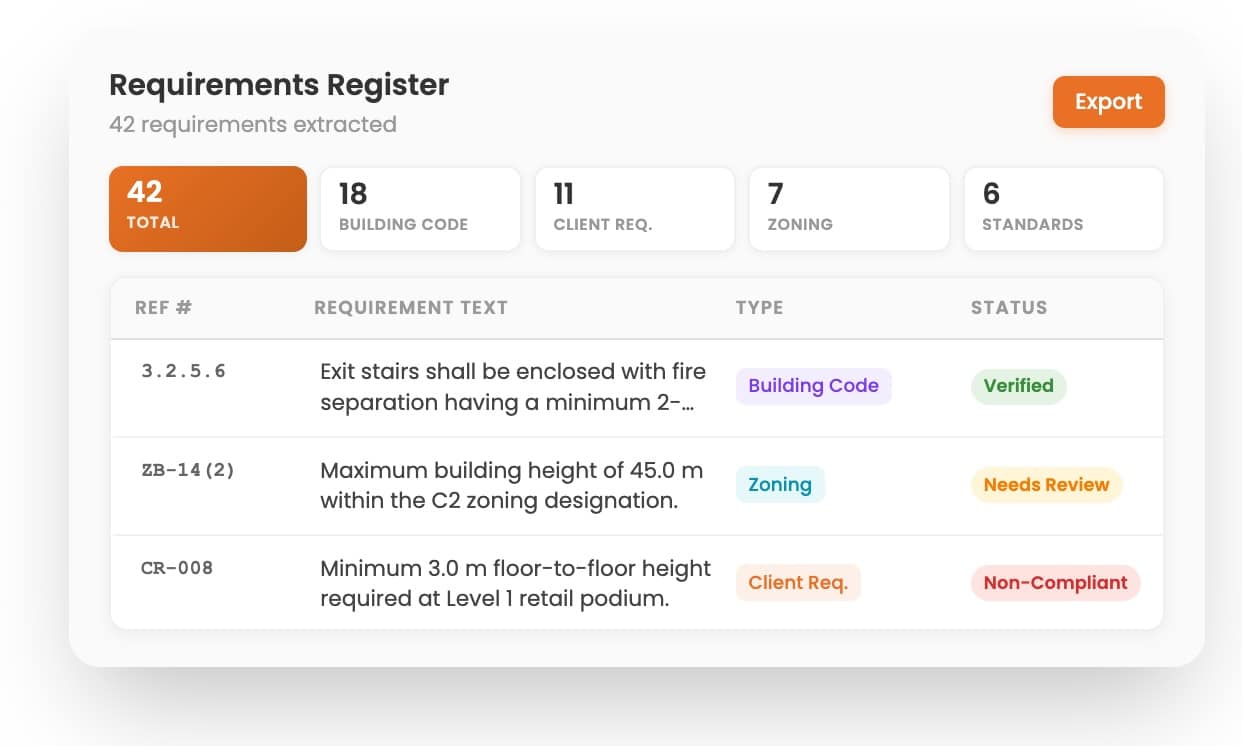
CODii is a new compliance AI tool that works on your own project data as organized in linked folders. Do AI inference on your project’s complete data.
The goal here is to have one searchable source of truth regarding every project obligation you, as an architect, need to meet. It also addresses deliverables, be they drawings and specifications or reports and calculations. Essentially, this gives you and your firm team the ability to ask natural language questions against your project documents. You are doing AI inference against your data to perform quality assurance and quality control (QA/QC).
CodeComply.AI
Nothing was more thematic at AIA26 this year than using artificial intelligence (AI) to perform code reviews on your documents and models. Unlike Architosh’s BEST of SHOW winner Kestrel Labs, CodeComply.AI works with uploaded plan sets. The company says, “CodeComply turns your plan set into a live, code-aware workspace—run jurisdiction-specific checks, test design alternatives, and produce cited documentation in the same tool you use to validate your drawings.”
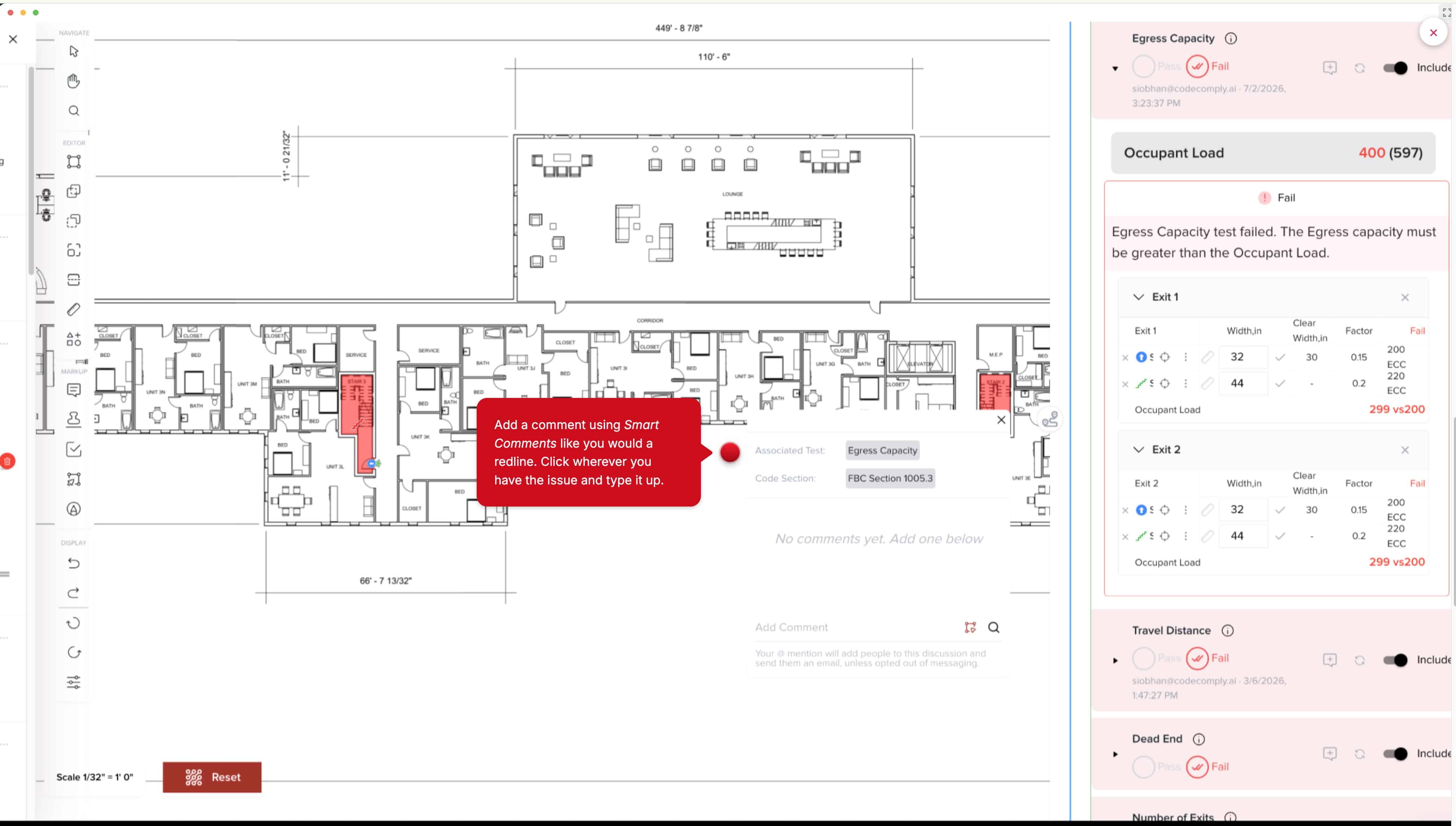
CodeComply.AI in action. The UI is in white with shades of pink and gray, with tools on the left and a dialog box panel on the right.
CodeComply.AI has a nice workflow and UI/UX for a tool working with plan sets alone. However, the limitation of tools that work with plan sets alone is that your code review process still needs to return to your authoring BIM solution. For many architects, this may not be a big deal. CodeComply also has a feature called VersionVue, which allows the user to compare plan versions, highlighting every change. This is again using AI technologies to compare your document versions. You can use smart filters to focus on only what matters most in the comparison. Like Bluebeam’s Compare features, color coding is used to show the original plan and what’s new.
Back to codes, this application works with IBC, IPC, IMC, NFPA 101, ADA, FHA, state-amended building and residential codes, and custom jurisdictions can be easily added. It works on any building type.
Other AI Software
xFigura.Ai
xFigura.AI has some notable world-class architecture firms listed as customers on its homepage. The AI platform offers over 45 AI models, and they are curated for the architectural process. These include abilities such as text-to-render, render enhancement, image-to-render, sketch-to-render, image-to-video, image-to-3D, rendering relighting, InPainting, design boards, and more.
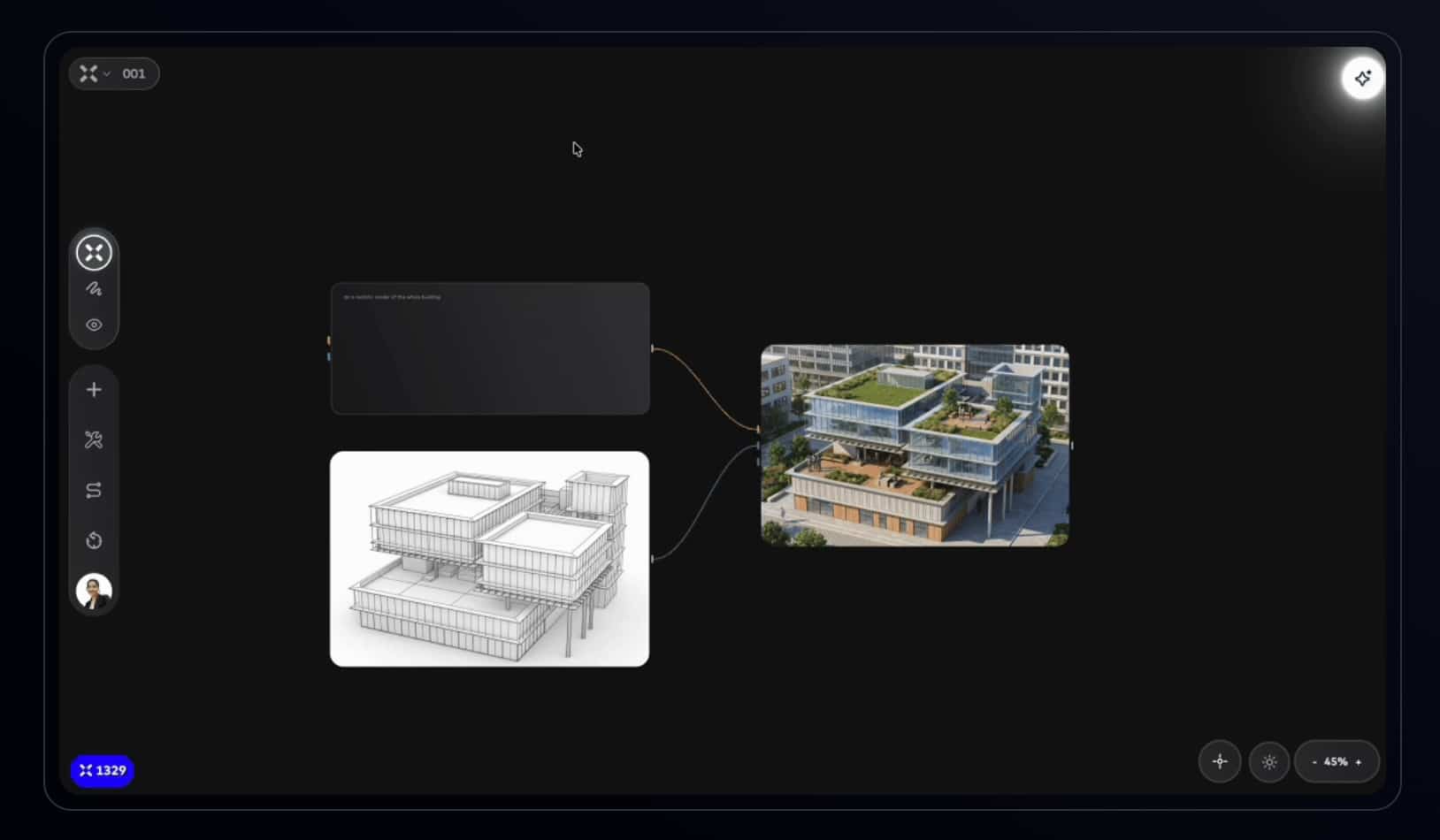
xFigura AI uses a node-based system for linking various functions and data. This takes place on an infinite canvas.
With xFigura, the canvas is an infinite board where you build, connect, and generate. Everything done in Figura lives on the canvas. There are no tabs, just one vast canvas which is your creative space. On the canvas, you can create and organize nodes. The node interface will instantly feel familiar to Grasshopper users, but Figura isn’t like Grasshopper. This is not an advanced algorithm-aided design (AAD) software. It is much easier than that.
Visualization Software
D5 Render
D5 Render was at AIA26 and enjoyed excellent traffic from North American architects curious to learn how real-time visualization works and how it differs from the competition. In Architosh’s view, D5 is highly competitive with the best real-time interactive renderers in the global market across a range of metrics, including visual quality and feature set.
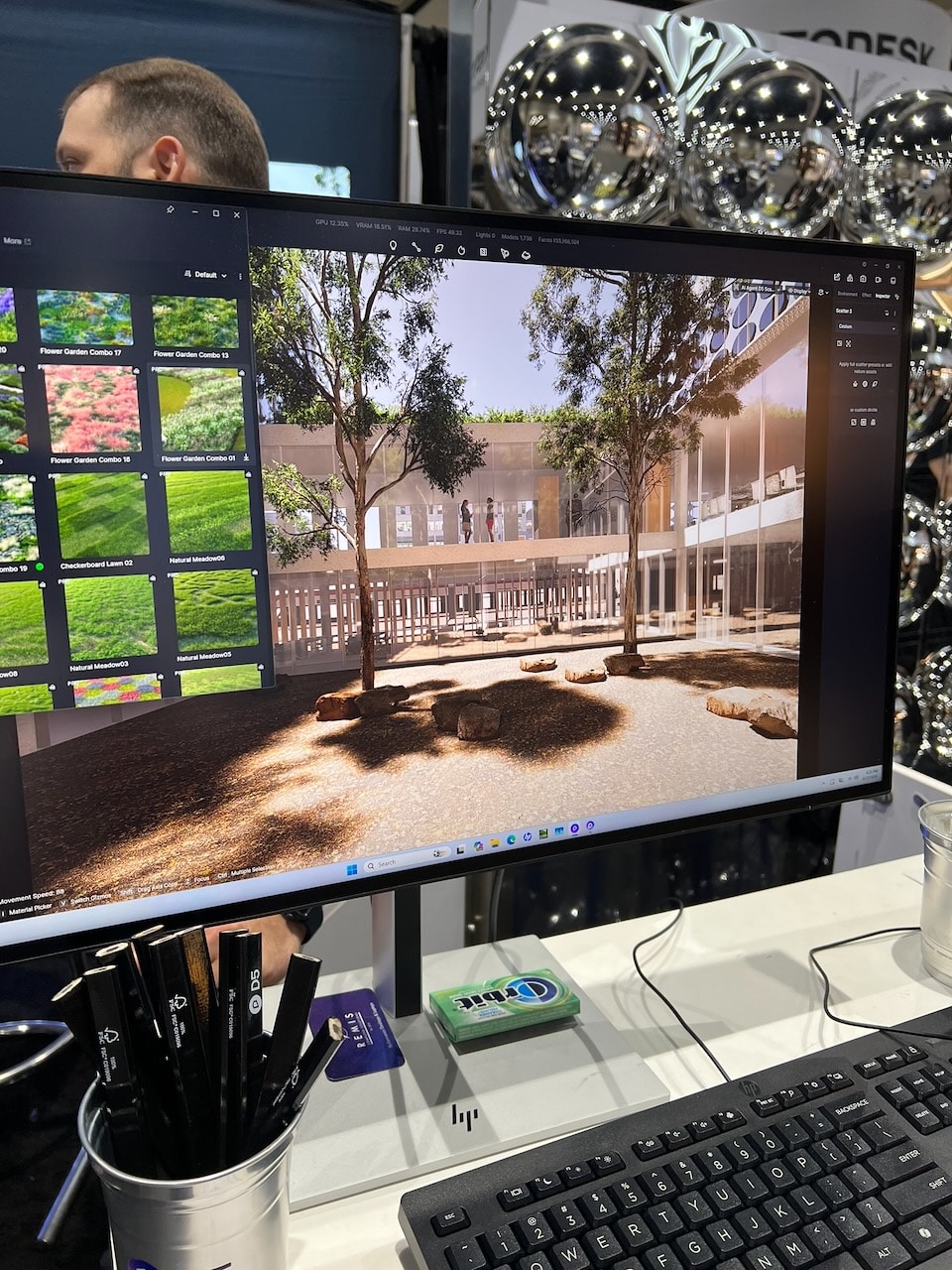
An image of D5 Render at AIA26 in San Diego on the show floor.
Realized not long after AIA26, D5 Render version 3.1 was released, with a shift in focus toward supporting interaction in collaboration workflows. Architosh covered version 3.1 in detail, which you can read here. (see: Architosh, “D5 Render 3.1: The Future of Architectural Design Reviews,” 17 Jun 2026).
Architosh Analysis: While D5 has been historically Windows-only due to a reliance on Windows DirectX 12 and DXR ray-tracing, the rendering company has announced this year that D5 Render is officially coming to the Mac. The D5 Render Engine is a proprietary real-time rendering engine built from the ground up by D5 specifically for the field of architecture. Unlike game industry rendering engines like Unreal (used in Twinmotion), the D5 Engine is optimized to handle the massive architectural datasets and complex lighting with a high degree of efficiency.
D5 leverages full path tracing, a higher form of ray tracing, and is built with a custom shader architecture that provides native optimal support on both Windows (DX12) and macOS (Metal). For those Mac users clamoring to get a Mac version, there is an official D5 Render Mac Waitlist here. Importantly, on M3 and higher, Apple Silicon supports hardware-accelerated ray tracing, so Mac users may need to update their systems once this native macOS version ships. For the D5 Mac curious who cannot wait, their Mac-native options include Twinmotion, Enscape, Blender, and the new Maxon Redshift Render for AEC.
Lumion
Lumion was arguably the premier real-time, interactive renderer when such rendering applications first emerged a decade ago. Despite its visual benefits, the software has long been noted for being resource-intensive and Windows-only. As Mac computers continue to gain market share worldwide and within architecture programs in college, this Windows-only posture is starting to change.
Lumion View is Mac-native and works with the latest macOS versions of SketchUp. This is a lightweight real-time rendering plugin that functions as a design companion, offers conceptual-style preset render settings (like clay, wood, etc.), supports customized artificial lights (point, spot, area), and provides quick 4K rendered output. However, the Mac version uses rasterization, as the developer’s native ray tracing and dynamic sky-cloud environments are still in development on the Mac.
Meanwhile, the latest Lumion 2026.1 update supports ray-traced panoramas, a new pattern editor, parallax interiors, and more.
Financial Software
Factor A/E
Factor A/E is financial software for the architect or designer’s practice. This includes all time-keeping, project financial planning and performance tracking, reporting, resource scheduling, and billing. The company says it is the most adaptable platform in the AE industry and thus is flexible enough for how various firms work and charge.
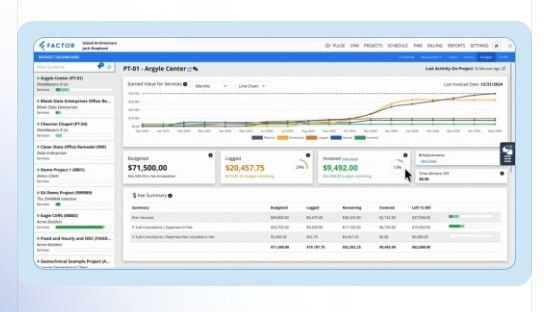
Factor A/E has firms covered with detailed and comprehensive financial dashboards.
Factor A/E is touted as more customizable than Monograph, particularly for invoices. As for fee-type billing, for firms that bill simply by hourly or a fixed fee, both Monograph and Factor A/E have you covered. However, for firms that charge a percentage of construction costs as their fee, these solutions stand apart. Factor A/E handles percentage of construction cost billing as a simplified Fixed Fee workaround. Mapping a percentage contract to Fixed Fee this way isn’t ideal, and that is where BQE, with its built-in Percentage contract rules, shines.
Monograph
The initial distinguishing feature of Monograph is its gorgeous user-interface graphics and information clarity. Monograph shines above its nearest competitors, Factor A/E and BQE, in this regard. Touted as “firm management software for architects and engineers,” Monograph is trusted by over 16,000 architects and engineers.
Monograph does full project accounting, builds budgets, assigns staff, forecasts performance, and handles billing and payments. Both Monograph, Factor A/E, and BQE offer compelling features and benefits, and all of them offer detailed pre-flight onboarding experiences as part of considering the software for adoption.
You can visit them online here: Factor A/E, Monograph, and BQE.
Other Show Reports
AIA26: Expo Show Report 1 — Autodesk
AIA26: Expo Show Report 2 — Nemetschek Group
AIA26: Expo Show Report 3 — Trimble and SketchUp
AIA26: Expo Show Report 4 — Chaos
AIA26: Expo Show Report 5 — neoBIM, and other AI apps
AIA26: Expo Show Report 6 — xFigura, CODii, others
AIA26: Expo Show Report 7 — Layer, Arcol, Egnyte and more…