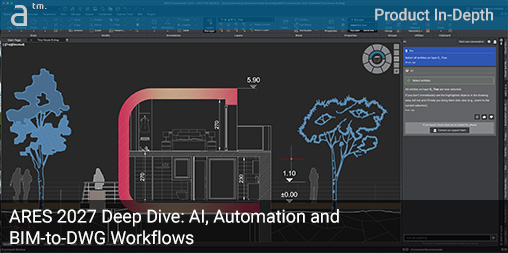
A UNIQUE FEATURE OF GERMANY’S ARES CAD software system is its unified “one CAD” experience across all supported platforms. ARES runs across desktop, web, and mobile on all major platforms with near feature parity, including on Linux—something its primary competitor, AutoCAD, does not.
New this year is support for Windows 11 and macOS 26 Tahoe.
The same platform consistency extends to ARES Touch on Apple iOS and Google Android, and, of course, ARES Kudo runs in a modern web browser regardless of operating system. This “One CAD” experience means users can deploy ARES at work on a Windows workstation and continue to work on the go with a M5-based MacBook Pro. It also means schools can run ARES Kudo beautifully on Chromebooks in Chrome, just as effectively as in another modern browser on Windows.
Key Takeaways in this Feature
- The ARES 2027 CAD ecosystem is the ultimate competitor to Autodesk AutoCAD; ARES products map directly to AutoCAD’s desktop, web, and mobile lineup.
- ARES 2027 CAD ecosystem distinguishes itself for its AI generative capabilities: AI-assisted block creation, voice input AI features, and A3’s new strengths in “editing” and creating CAD entities, and more.
- ARES uniquely features both BIM-to-DWG automation capabilities, plus extensive cloud-based drawing automation that now works directly from its desktop solutions.
- ARES can now streamline BIM-to-DWG workflows with discipline (A+S+MEP) management control, reflecting how real BIM projects get coordinated, plus full support for Autodesk Forma Data Management (CDE) integration.
These are the big takeaways, but we dive deep into many of these aspects in our Product In-Depth below, plus be sure to read our Closing Remarks and references to other key articles.
Part One — The AI Pivot
This year, Graebert has pivoted even harder toward AI technologies, though the company has already been at the forefront of AI within the broader CAD market. Architosh has written extensively about ARES in the past, including its A3 AI agent in ARES Kudo. (see: Architosh, “ARES Kudo adds BIM Drawings Automation and AI—Challenges AutoCAD,” 5 May 2027)
Graebert’s aggressive push into AI is not surprising given the rapidly rising importance of artificial intelligence in everyone’s lives. But it is especially critical for Graebert, given competition from its primary rival, Autodesk AutoCAD. For the Berlin-based “middle power” in the CAD world, competing with an industry “super-power” like Autodesk is no easy feat. ARES has managed this by being early, innovative, and aggressive.
The 2027 versions of ARES continue this AI push with new generative AI capabilities and a more even deployment of its AI and automation features across its desktop and web-based platforms. In this article, we explore those advances in detail.
Compatibility Focus
While several major native DWG CAD competitors operate in the broader CAD market, Berlin-based Graebert remains the most direct and interesting “dueling opponent” with Autodesk AutoCAD. This is not to say other competitors lack unique strengths—they do—but Graebert has challenged US-based Autodesk head-on rather than leaning primarily on industry-vertical differentiation. The result has been striking, with AutoCAD displaced inside major companies in Japan and South Korea. (see, Architosh: “ARES and AutoCAD — Locked in Global Duel for DWG Supremancy,” 23 April 2025).
Competing head-on means ARES Commander competes with desktop AutoCAD, ARES Kudo competes with AutoCAD Web, and ARES Touch competes with AutoCAD Mobile.
Both Autodesk and other DWG CAD platforms have introduced AI capabilities that overlap with ARES’s A3 AI-agent features in some areas and diverge in others. This product’s in-depth article, however, focuses on Graebert’s AI features and largely avoids direct comparisons with competitors’ AI capabilities.
Readers curious about Graebert’s AI and automation advancements in the ARES Trinity of CAD solutions should sign up for the company’s June event (see: Graebert neXt event, 3 June 2026 – highly recommended to register here!)
Part Two — AI Highlights
Meet A3—ARES’ AI Assistant
Graebert’s AI agent, called A3, is partially built on OpenAI’s technology—the same technology behind ChatGPT. It was first introduced in March 2024 as part of the desktop solution, while Architosh later covered its arrival in Kudo. (see: Architosh, “ARES Kudo adds BIM Drawings Automation and AI — Challenges AutoCAD,” 30 Mar 2025).
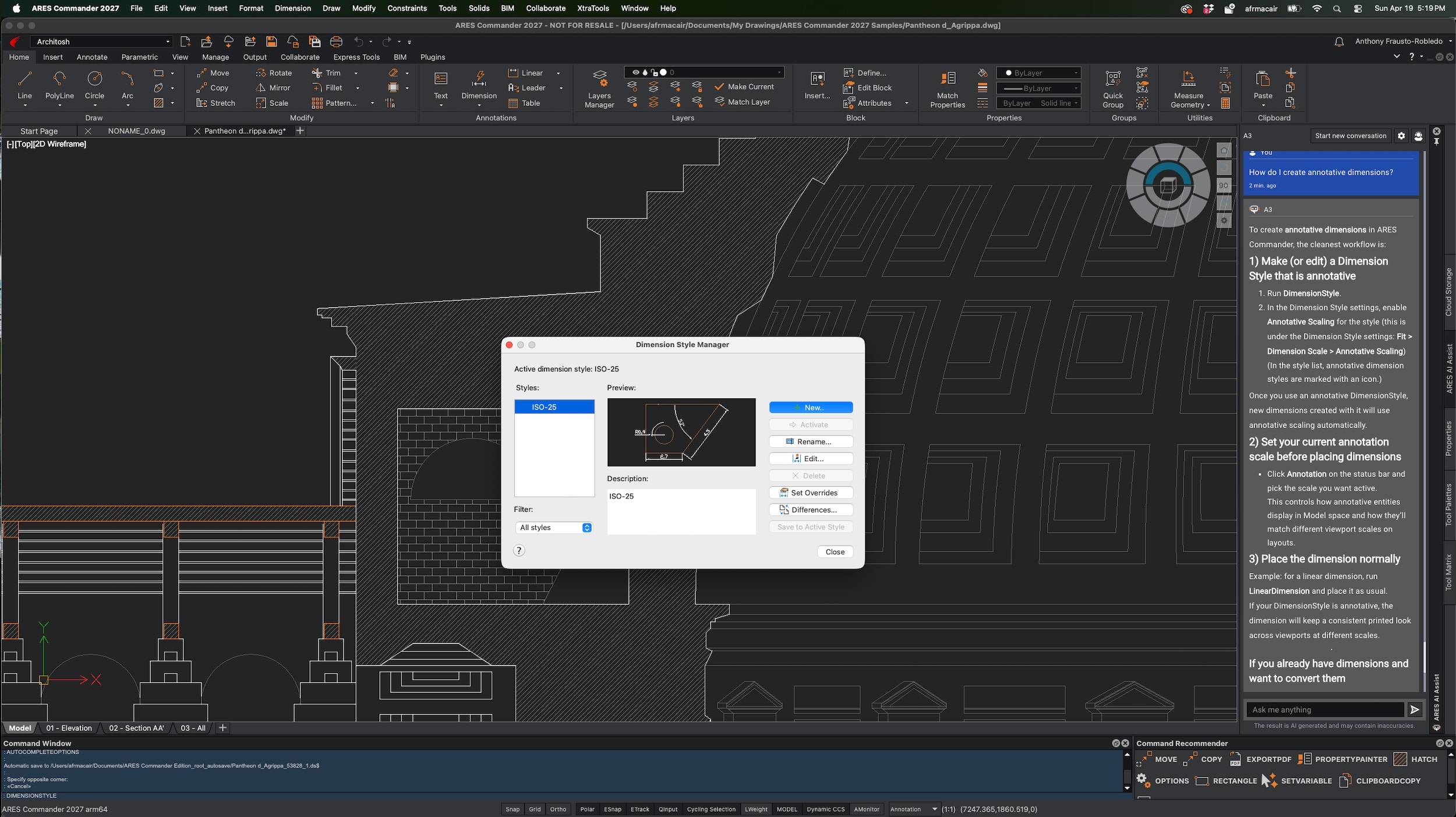
210 – A3 is a marvelous assistant and teacher and will guide the user’s queries about learning or how-to-do commands in ARES products with all possible answers, giving the users an education in both command-line and menu and toolbar-driven workflows. (click on image to expand large, typical all images)
As we noted a year ago, A3 has a commanding knowledge of how ARES products work and can provide step-by-step instructions. When multiple methods are available, A3 provides the steps for each approach. Because I learned this year that OpenAI’s technology powers A3, I asked it how to perform tasks as if I were a CAD user from another platform learning ARES for the first time. (IMAGES 210-211)
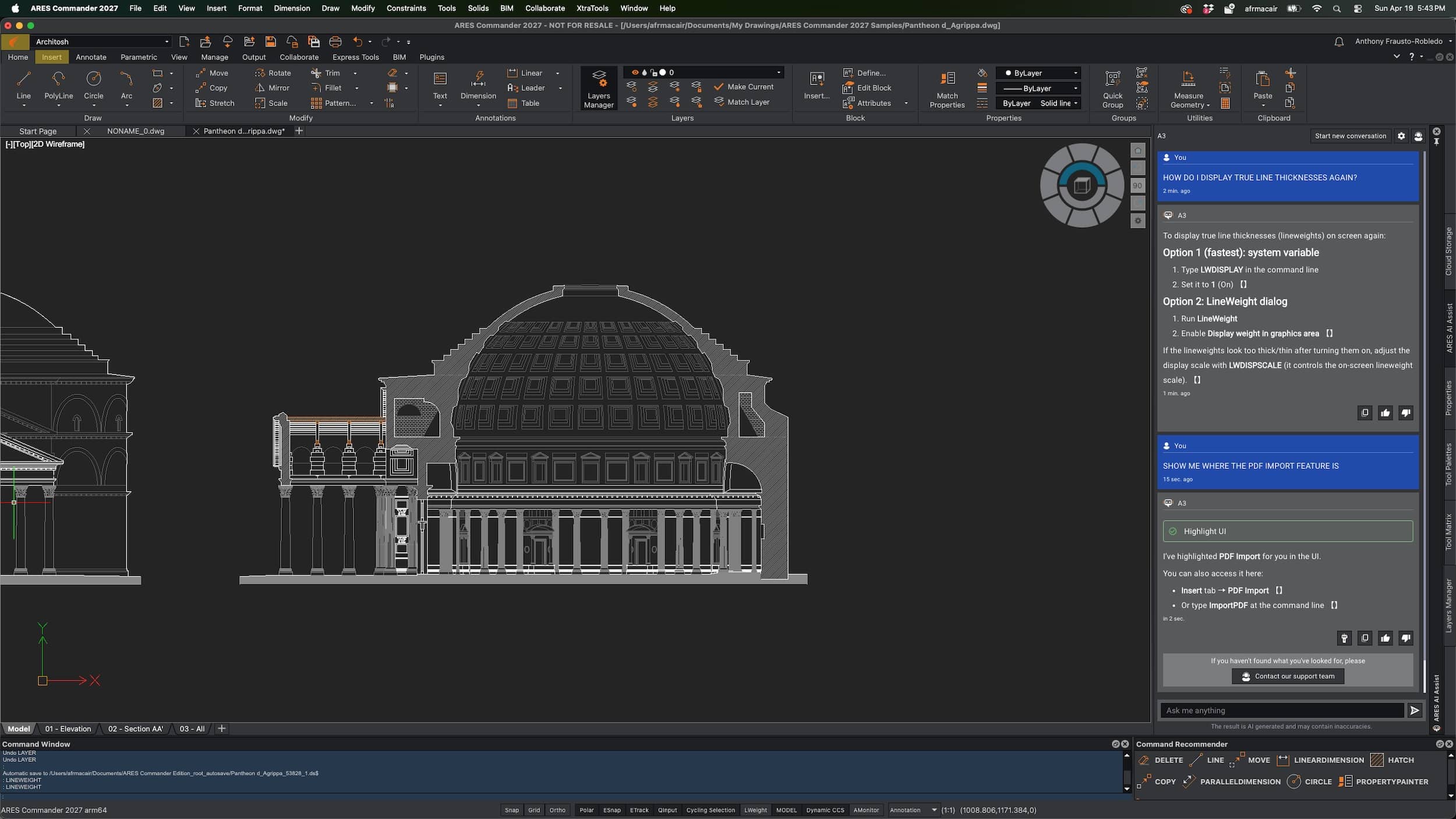
211 – Menu highlighting, when paired with A3’s CAD assistance, greatly helps the ARES user (new or veteran) execute commands they may be unfamiliar with.
Unlike Gemini, ChatGPT, or other general AI tools on the Internet, A3 is built directly into ARES. Its instructions are paired with user-interface highlighting, showing users where to find specific menus and tool buttons. This works multiple levels deep: A3 highlights a button, then, after you click it, highlights the next-level button, and so on.
As someone who has used several CAD/BIM/3D tools in professional practice and reviewed dozens more, I can honestly say that moving in and out of different CAD solutions over long periods naturally leads to forgetting how things work. This year, while using A3 to test features, it dawned on me how powerful an AI assistant like A3 can be at minimizing the switching costs of moving from one platform to another.
This year, while using A3 to test features, it dawned on me how powerful an AI assistant like A3 can be at minimizing the switching costs of moving from one platform to another.
When starting a new conversation with A3, the assistant provides sample query suggestions, such as “What is a markup?” or “Show me where the hatch feature is.” A regenerate button produces three new suggestions each time. But here is a thought I had: “Why not make these suggestions part of a structured learning path for ARES—especially one aimed at users coming from specific tools such as AutoCAD, Solid Edge, Vectorworks, or BricsCAD?”
MORE: Graebert neXt 2027 Event Page
Given A3’s ability to connect answers to UI highlighting, this seems like a strong future opportunity as AI technology continues to evolve, with training that can provide more structured in-situ guidance and learning lessons.
A3 can also help customize the ARES user interface, answer general concept questions—such as “What is a custom block?”—perform unit conversions, function as a calculator, and respond to industry-specific prompts. For example, it can suggest layer names for an architectural drawing. (IMAGE 214)
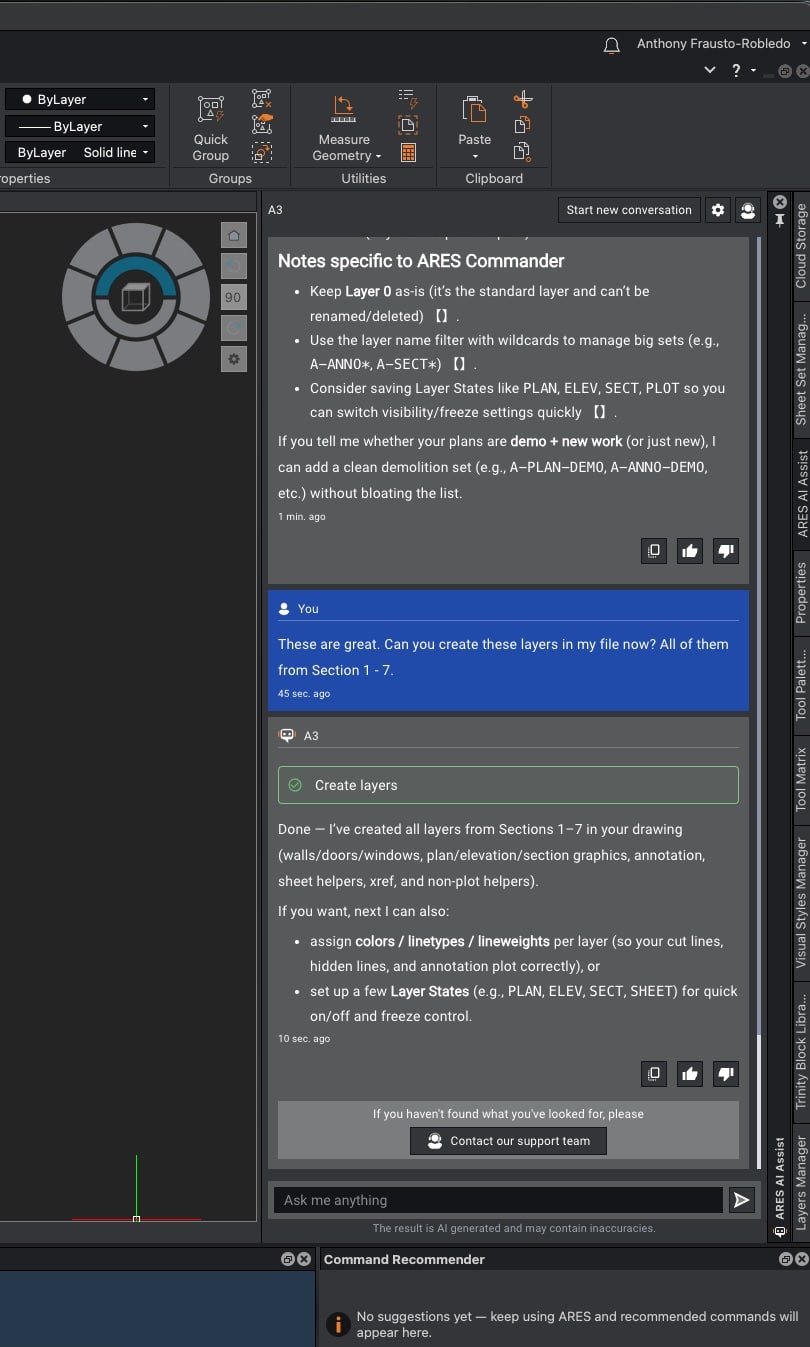
214 – Industry knowledge is also a domain specialty of A3 in ARES Commander 2027 and ARES Kudo Professional. I was able to ask A3 to create layers in a blank file and make them conform to an industry standard. A3 prompted me back, asking for clarification on several good points, and with final answers, proceeded to create all the layers I needed in my drawing file. (see IMAGE 215 for results)
After generating an industry-standard layer list for an architectural drawing without interiors, structural, or MEP requirements, the obvious question becomes: wouldn’t it be useful if A3 could actually create all those layers?
In ARES 2027, it can. With one command next to A3, and after about 25 seconds, all my layers were created. (IMAGE 215) Because A3 can create layers from within the context of a chat session, users may naturally wonder whether it can create almost anything in the drawing or inside the ARES user interface.
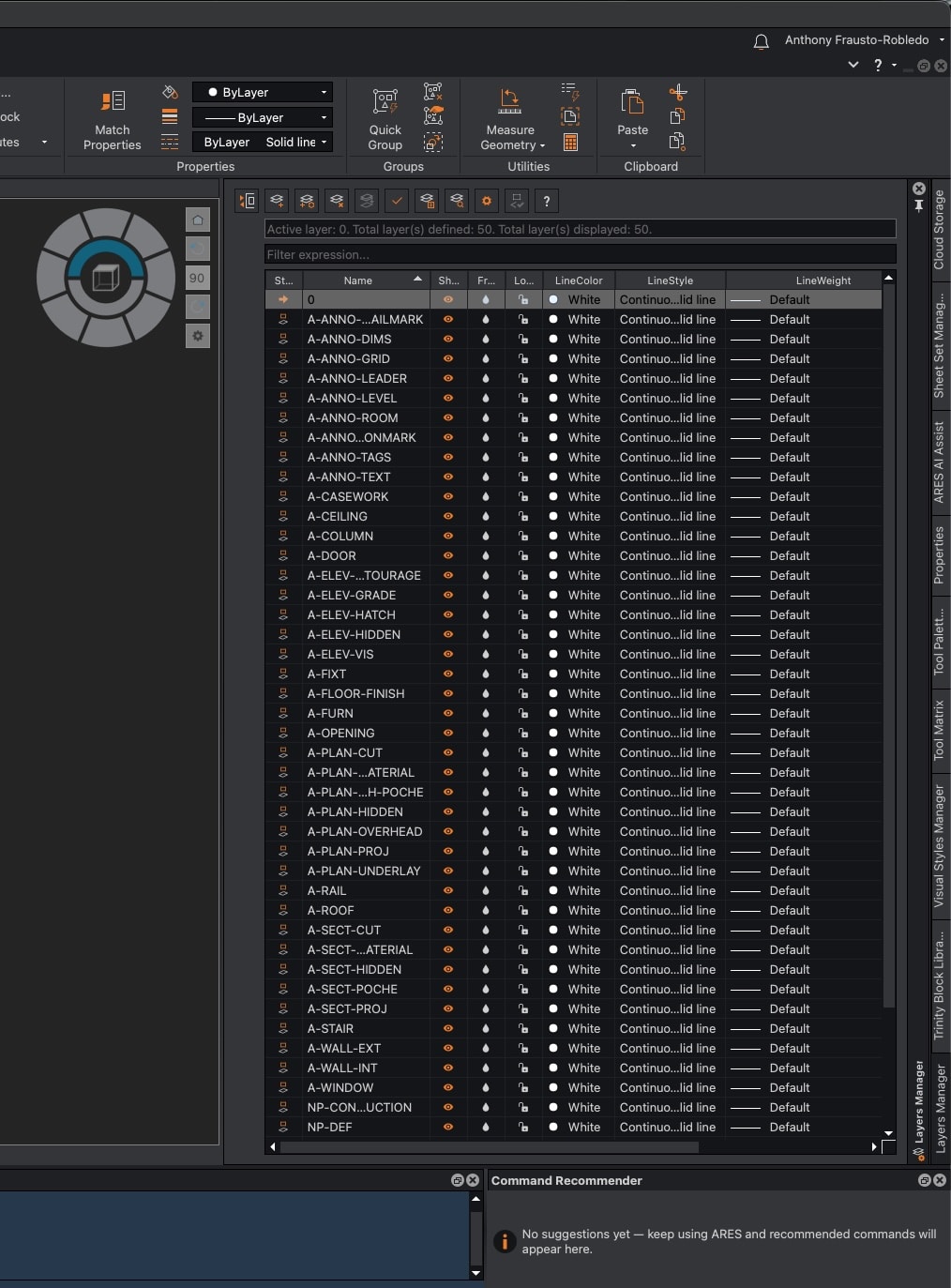
215 – A3’s ability to create layers was one of the more practical and impressive AI features tested.
The short answer is no. A3 can create entities in a drawing and create items such as layers, but it cannot do everything yet. For example, it cannot change the background color to white or black directly from chat. Instead, it shows you the steps to make user interface changes.
A3 remains particularly strong at locating UI features. This is why I made a point of using A3 more deliberately this year when testing new features in ARES 2027 products. I have to say, A3 seems super solid in helping with the guidance aspects of learning ARES.
New Multi-Task Prompting
New this year in ARES Kudo is A3’s ability to perform “Editing” commands, including the creation of drawing entities. These features were already present in Commander last year and include commands such as selecting all polylines, arcs, or circles in a drawing. Users can also ask A3 to select all lines with a specific lineweight.
A3’s multi-task prompting enables selection and modification in a single prompt. For example, A3 can select all lines with a specific lineweight and change their color to blue. It can select all blocks on a named layer and rotate them by 30 degrees, provided the layer is cited precisely.
In one test file, I asked A3 to select all entities on layer 0—a common cleanup and block-control task—and it performed the task efficiently. (IMAGE 220)
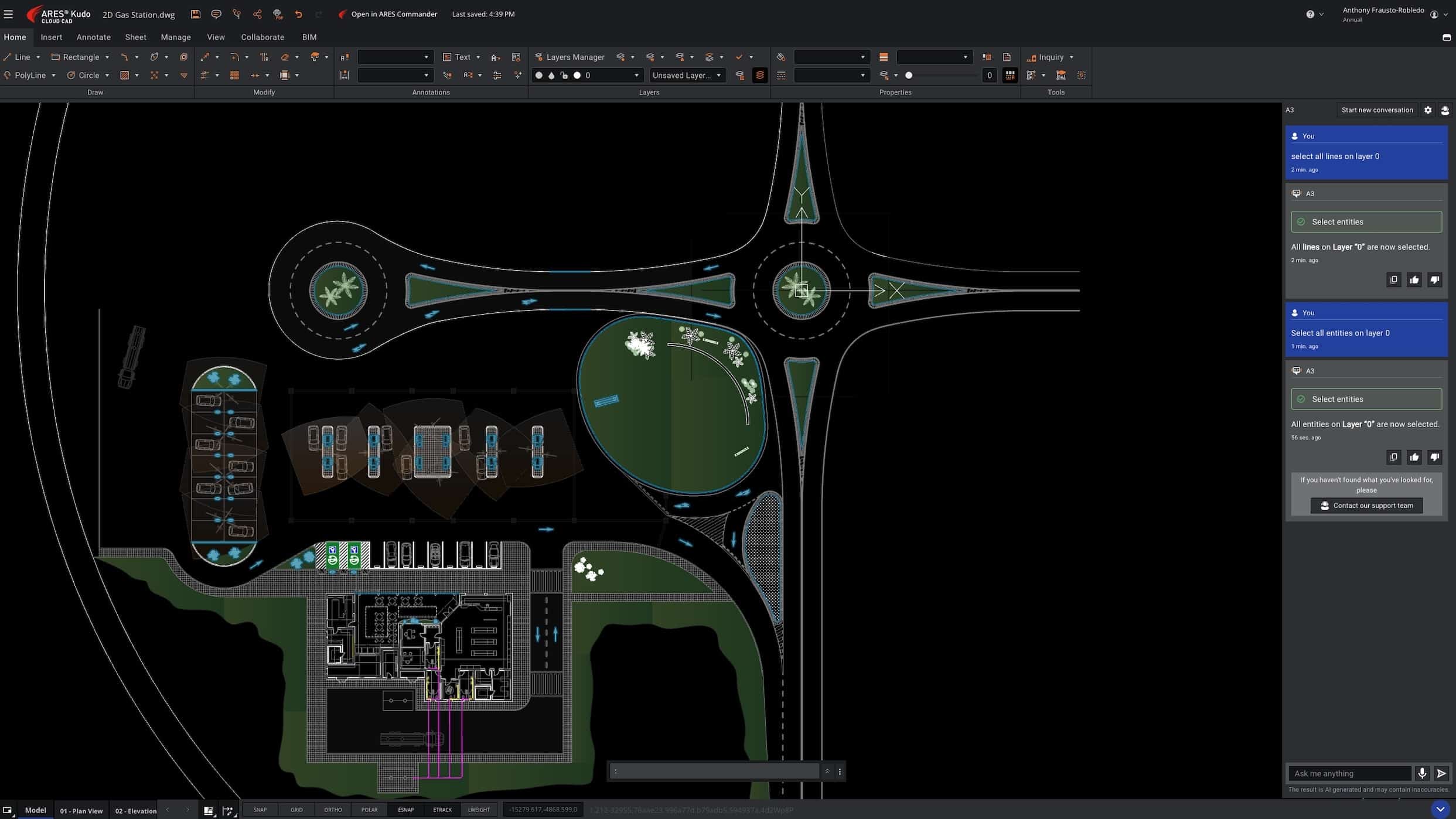
220 – A3 Can select entities on a specific layer, for example, I asked to find any entities on layer 0, and it did that perfectly.
In another test, also executed in ARES Kudo Professional 2027, I asked A3 to select all entities on layer C-MUEBLES and change their line color to yellow. It completed the operation in a single prompt. (see images 221–222, and click on all images to make them large).
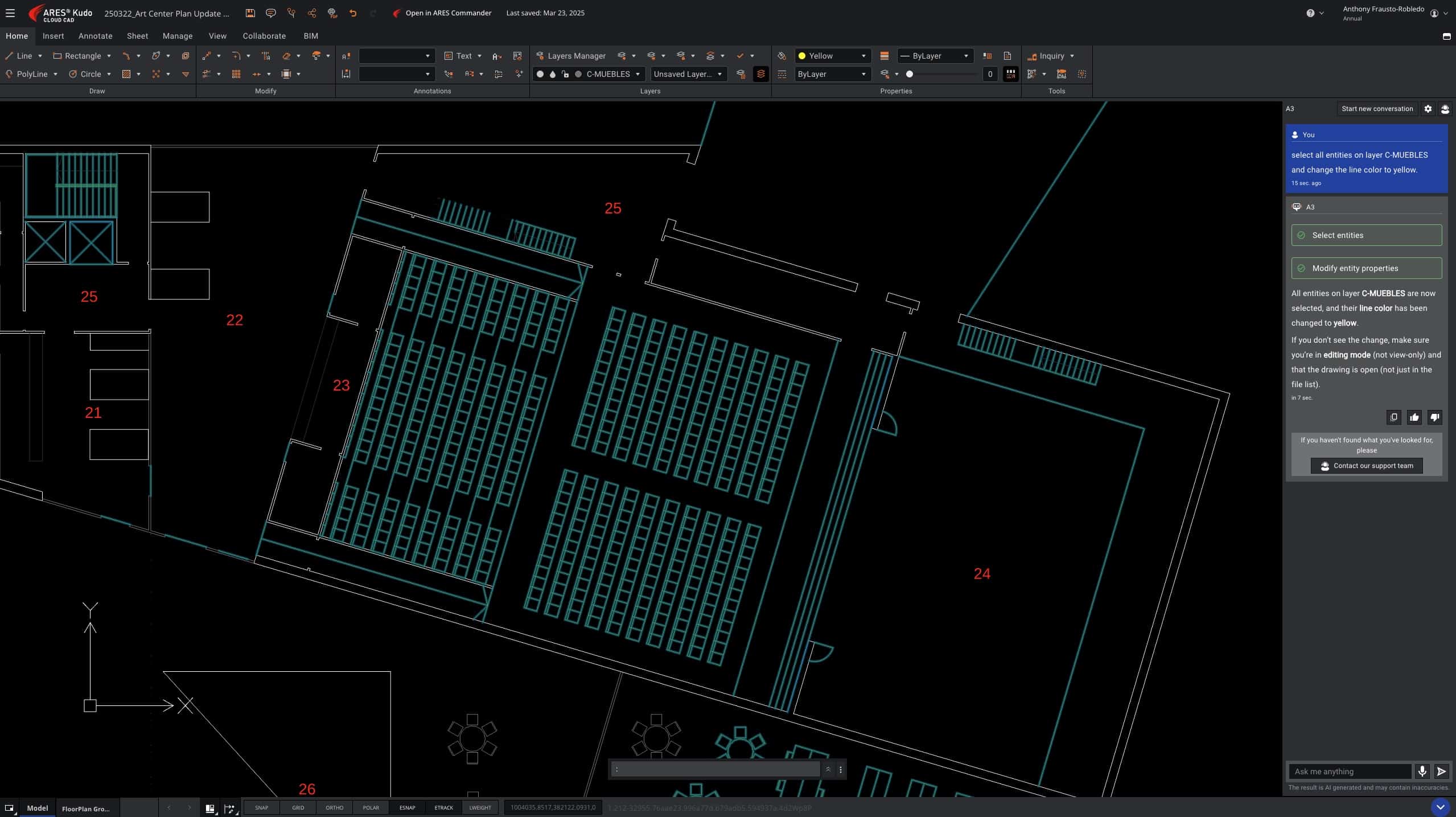
221 – Select entities and change their line color, part 1.
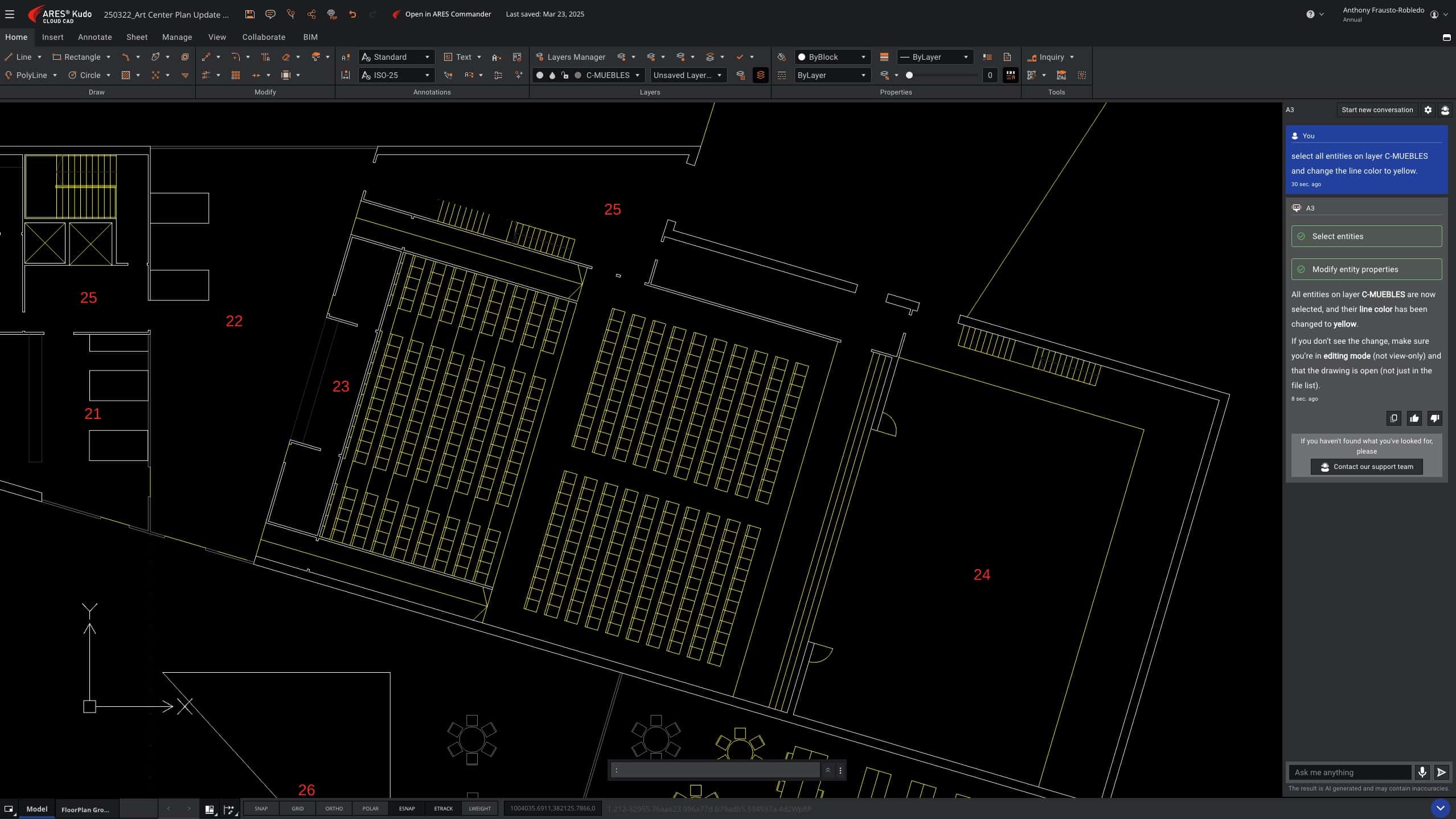
222 – Select entities and change their line color, part 2.
Although Graebert does not heavily emphasize this point, A3 can also create elements—not simply select them and perform actions such as changing lineweight. To begin a first line, A3 needs a coordinate point for the start point. In my first test, I supplied both start and end coordinate points for the first two lines and also instructed A3 to assign a specific lineweight and place them on a specific layer. A3 handled this without issue.
In another test, I again provided a coordinate start point for the first line. From there, I could command A3 to create new lines from the start, end, or midpoint of existing lines. It even handled a prompt like this:
“Draw a new line from the midpoint of the second line you created right on the x axis another 15 feet, then up on the y axis to a distance set parallel to the first line. Then draw a new line from the end of that line back to the endpoint of the first line you drew [sic] for me.”
A3 achieved the goal impressively. Notice a few things. First, my prompt contained a grammatical error in the last sentence, but A3 understood the intent. Second, I used natural language expressions such as “draw up,” “a distance set parallel to the first line,” and “the end of that line.” A3 accomplished all of this, including registering distances based on vertex points described in natural language. (IMAGE 227)
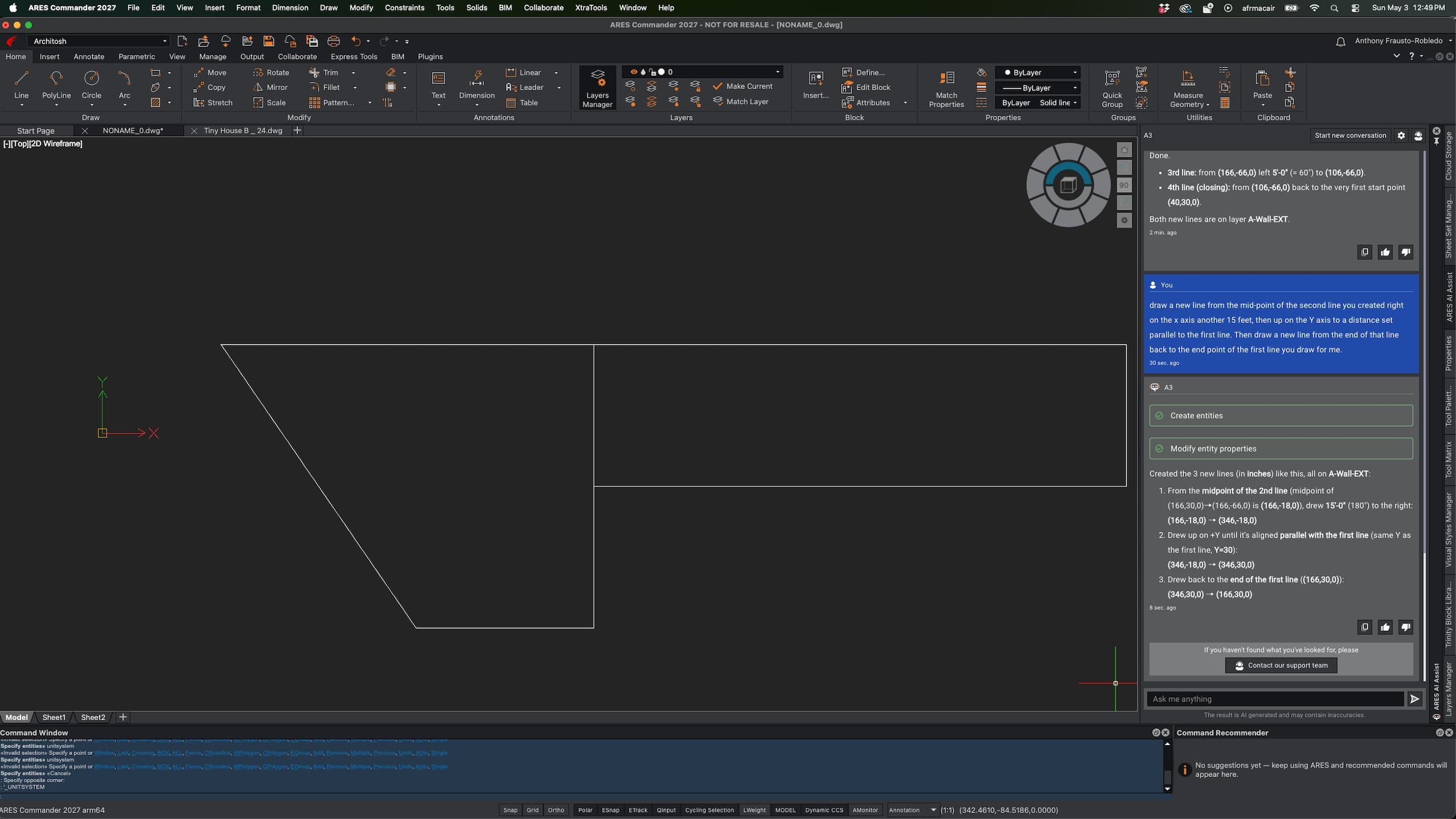
227 – A3 can also create CAD entities. It can draw for you. This kind of capability is very early for AI and CAD, but it strongly suggests a more captivating future of commanding your CAD program to assist in drawing production.
Truthfully, asking A3 to draw these lines is not faster than drawing them manually. But the point of the test was to see how well A3 could interpret plain-language drawing directives. One can imagine using AI itself to create vastly more complex prompts, pasting them into A3, and seeing what happens.
For one final test, I wrote the following prompt in another app and pasted it into A3:
“Begin a line at 5,5,0 and draw that line 20 feet right on the x axis. Next draw a second line down on the y axis 20 feet. Then a third line left on the x axis 15 feet, then a fourth line up on the y axis 6 feet, then from the end of that line draw a line to the start point of the first line. Next draw a line from the midpoint of the first line down on the y axis 10 feet, then begin a new line from that line endpoint to the midpoint of the second line.”
The result was fast. It took exactly 16 seconds to execute the prompt just described and draw the objects, followed by about 2–3 seconds for A3 to describe what it had created inside the A3 palette. (IMAGES 227-228)
I then used A3 to change line colors by referring to the lines in the order they were created, using terms such as “first” and “last.” (IMAGE 228)
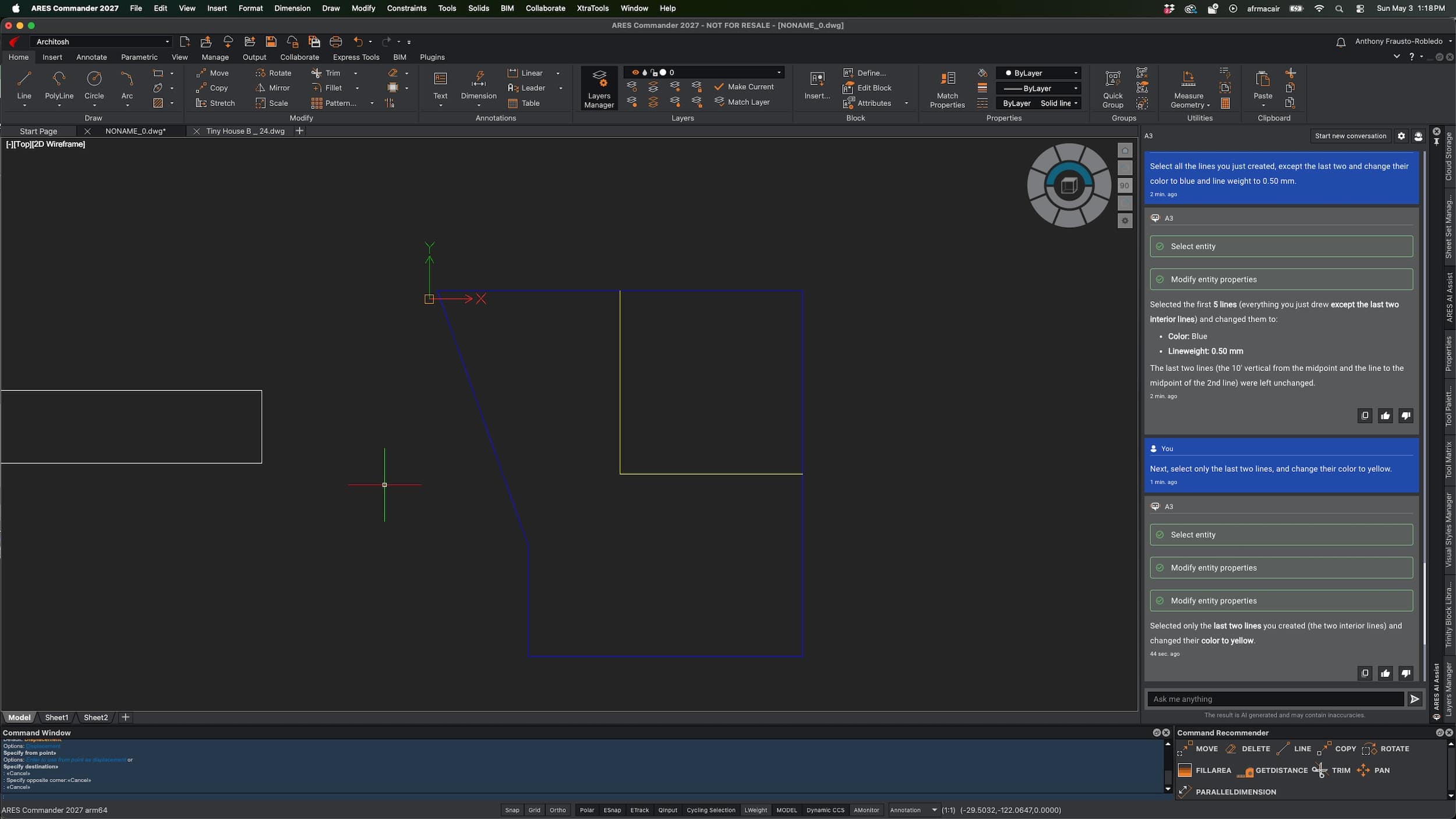
228 – A continuation of a more elaborate prompt for A3, described above, with A3 fully understanding terms like “first” and “last” in reference to already AI-produced lines.
While my examples—even the most advanced one—may seem primitive, they represent a shift from manual geometry creation to high-level orchestration: from explicit manual creation, to deterministic tools that follow drawing instructions, to declarative tools where users describe what they want.
New: Voice Interaction in Kudo
In considering the broader implications of deterministic and declarative AI tools in CAD and BIM, voice input could have a meaningful impact on speed. Typing takes time. Speech is often faster.
New in ARES Kudo Professional is the ability to talk to A3 using your voice.
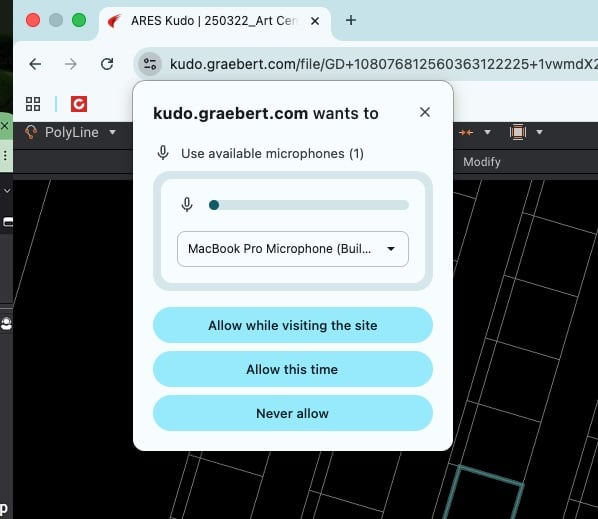
230 – ARES Kudo’s A3 supports voice input. But you must first give it permission.
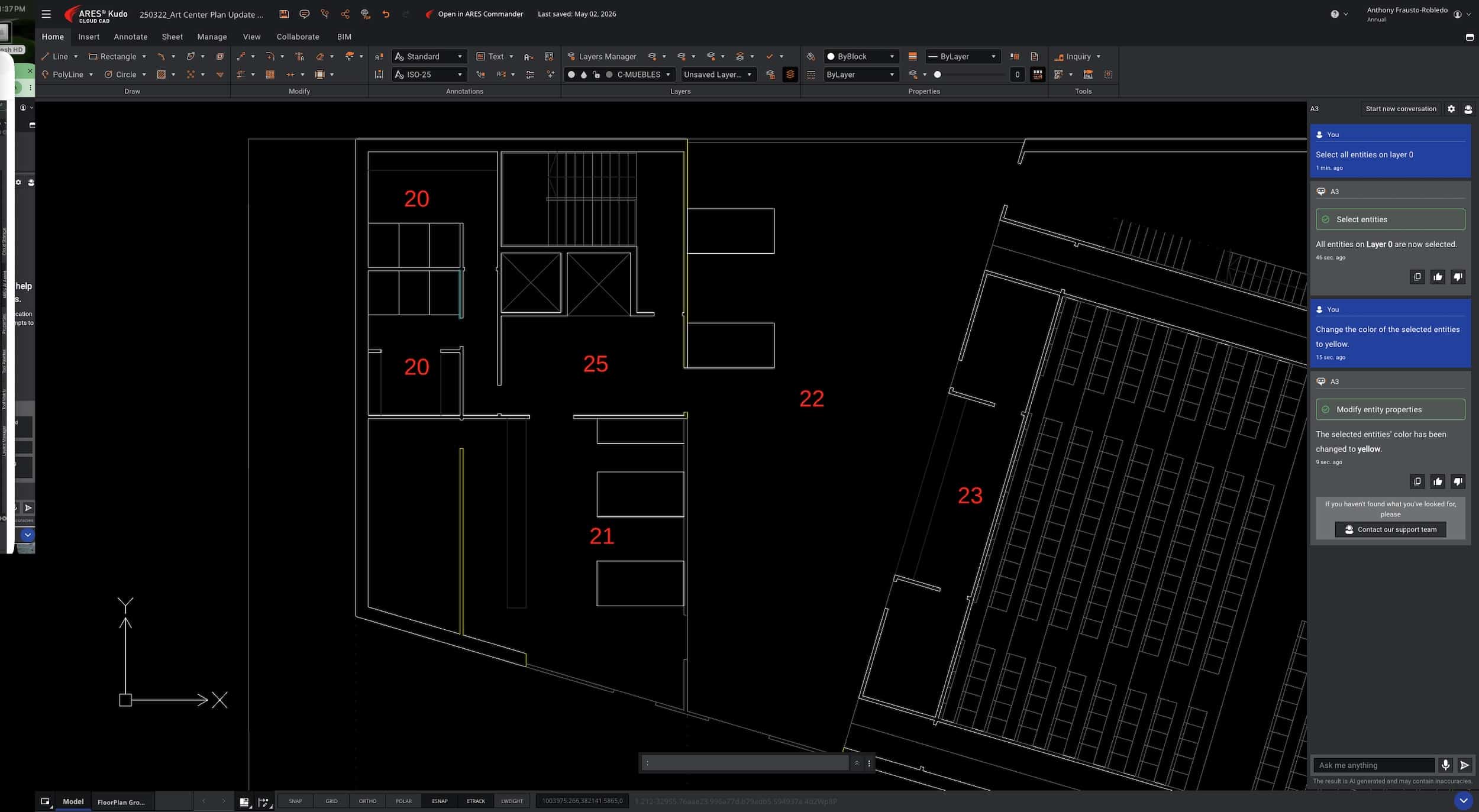
231 – A view of the voice input in A3’s palette.
Inside Kudo’s A3 palette, users click the microphone button at the bottom. Kudo then asks for microphone permission. (IMAGE 230) Users can speak to A3, which listens and converts speech into written prompts. The user then clicks the arrow button to execute the prompt.
I asked A3 to select all entities on layer 0, then asked it to change that selection’s line color to yellow. (IMAGE 231)
New: Command Recommender in Commander
Another new AI feature is Real-Time Command Recommendation. In the lower-right corner of the ARES interface, the Command Recommender palette lists six commands most likely to be used next. This AI-powered widget is based on Graebert’s own AI engine, using smart algorithms that analyze user interactions and command history in real time.
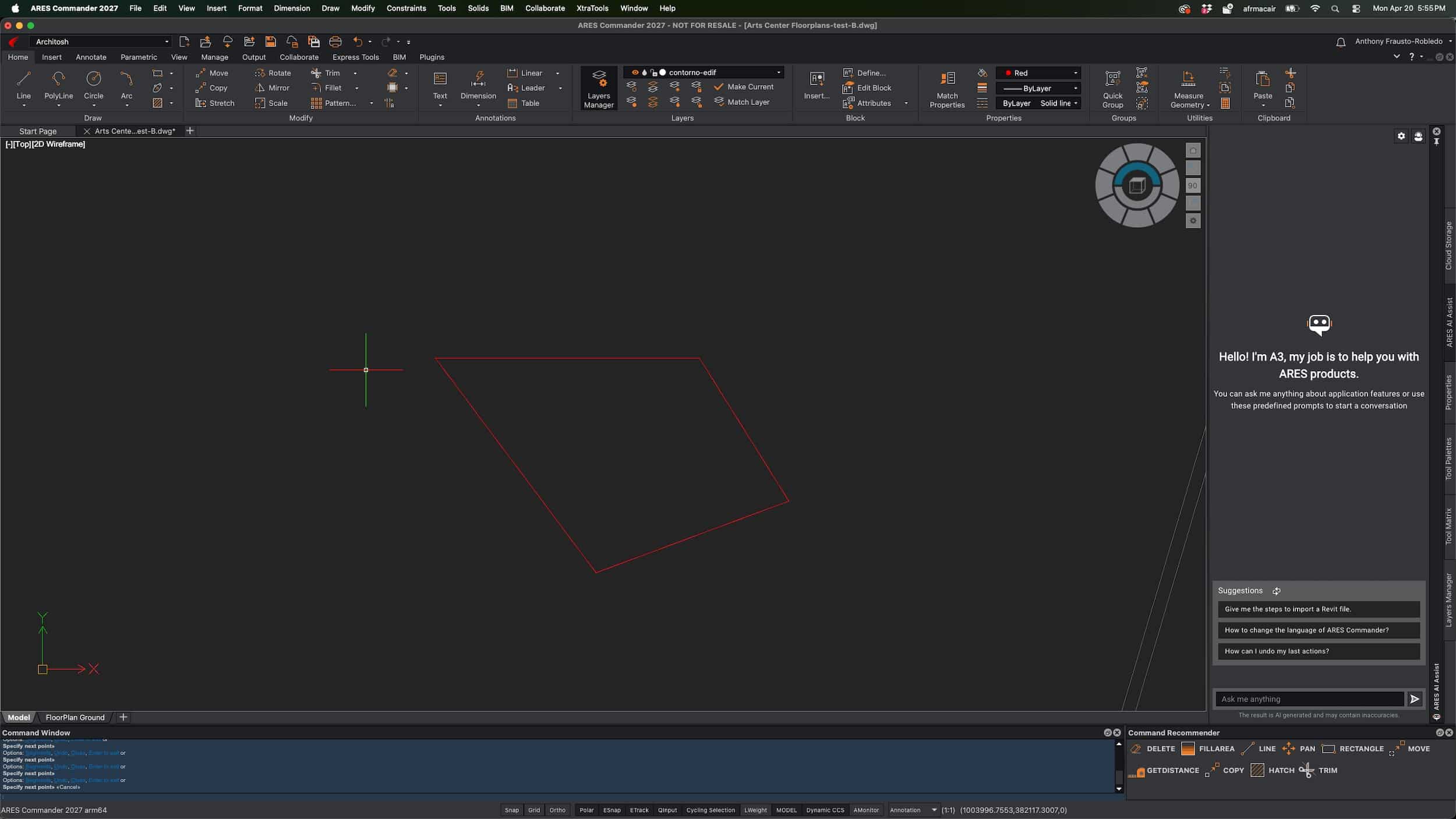
240 – The AI Commander Recommender is in the lower right of this image. This feature is handy, and we understand it will continue to advance. It is based on Graebert’s own AI technology.
In one 2D workflow, I created a series of lines forming a closed, complex triangular shape. The Command Recommender suggested likely next commands such as Delete, Move, Pan, Hatch, and Rotate. I selected Rotate and performed the command, after which the recommendation list changed. Some commands, like Pan, appear to remain in the palette continuously, but overall, this new feature seems quite useful.
New: AI Text Tools
New this year in ARES Kudo Professional, and previously available in Commander, Kudo’s MText editor now includes AI-driven tools for translation, writing refinement, spell checking, and summarization.
Users can access these AI abilities with Note and SimpleNote entities. This differs from using A3 to translate text, though A3 is also fully capable of doing so.
New: AI-Assisted Block Generation
One of the more intriguing AI uses in ARES this year is AI-assisted block generation. This rapidly evolving feature is part of A3’s cloud-based technology. Because it runs in the cloud, Graebert can deploy the same AI capability to both the desktop-based Commander solution and the browser-based Kudo solution. (IMAGE 250)
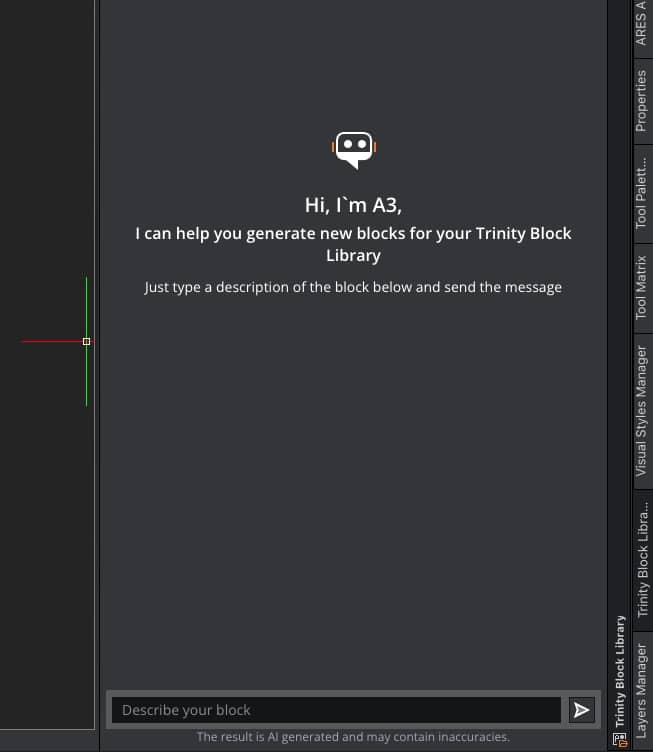
250 – AI-assisted block generation is “generative AI” inside ARES. This technology is highly useful for certain kinds of things you must draw.
The AI responds to “prompt descriptions” of the desired block and generates three versions. These initial results are non-vector graphics. The user selects the preferred option, saves it as a block, names it, and the AI translates it into a vector CAD object. (see IMAGES 251 – 252)
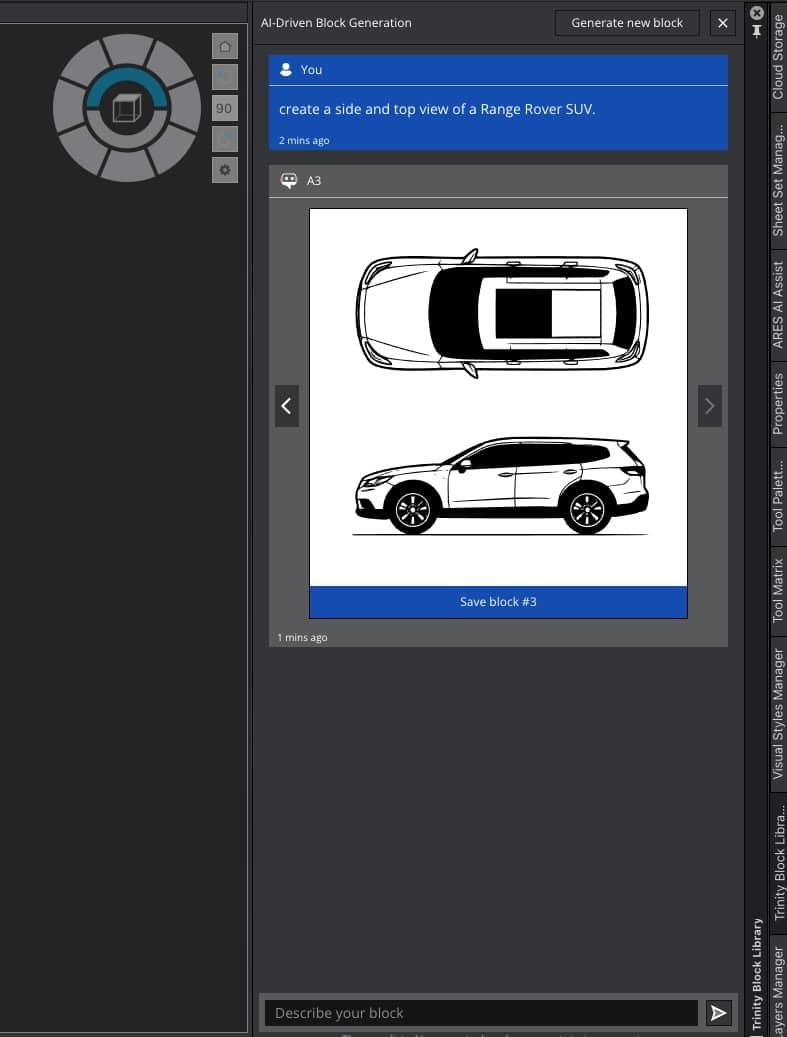
251 – Asking A3 inside the Trinity Block library to generate a Land Rover in top and side view.
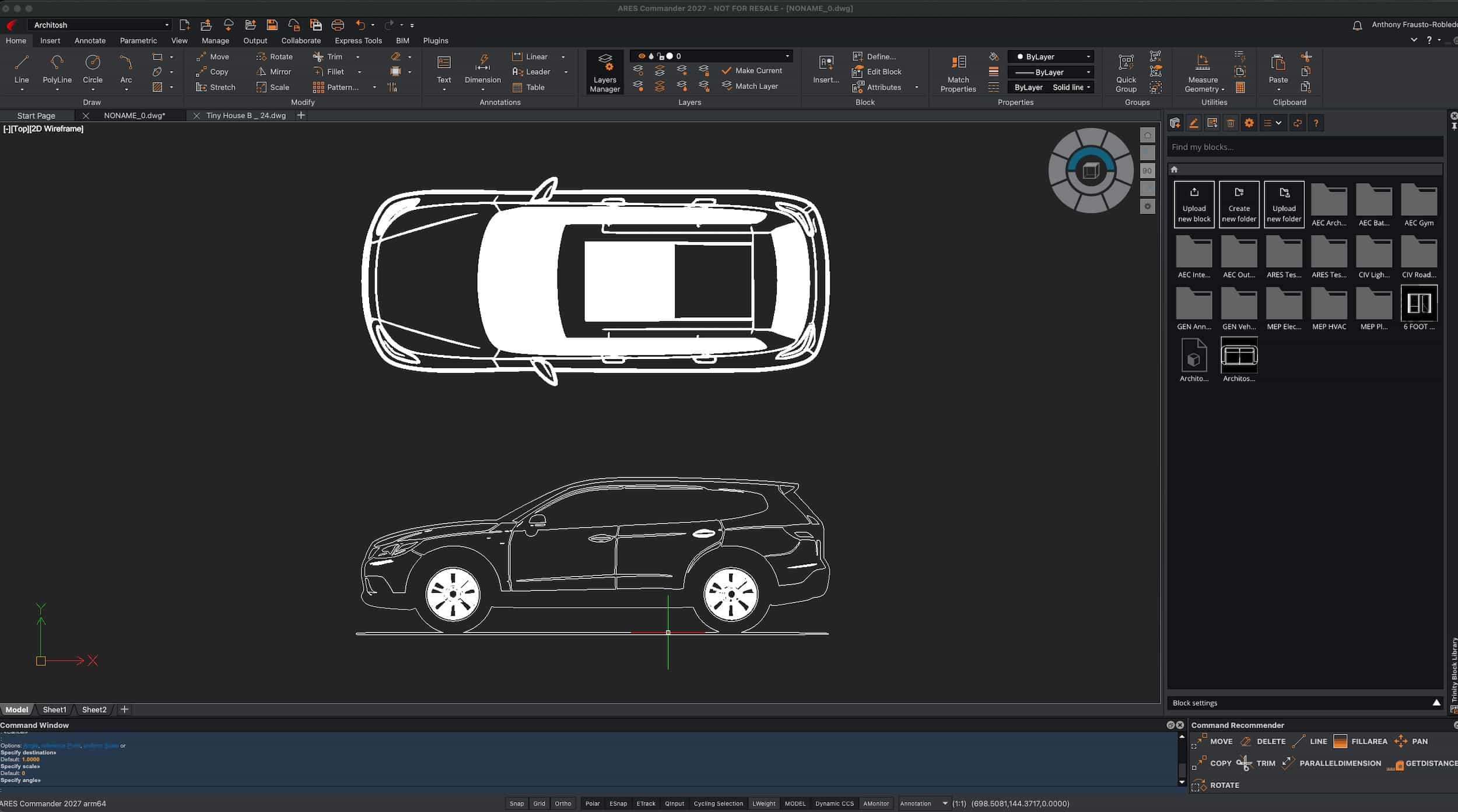
252 – The finished product, the new AI-generated block of a Land Rover.
AI-assisted block generation appears best suited for complex elements such as furniture, site objects, trees, or cars in architectural drawings—items that can be time-consuming to create manually. Importantly, the process in ARES 2027 is generative and appears to create geometry in a “unit-less” environment. When the block is placed into the drawing, users can scale it before final placement, in addition to the normal block-insertion options.
Looking across the AI features in the ARES 2027 ecosystem, Graebert has further differentiated itself from DWG CAD rivals by positioning ARES as an AI-generative CAD leader, while A3 remains strong as an AI-driven assistant. These are two distinct sides of AI in CAD, and both benefit the user.
Part Three — BIM, Automation, and Cloud Processing
Online Drawings Automation — Now in Commander
While AI assistance helps users learn and get more out of CAD software, and generative AI helps users create content faster, Drawings Automation represents another major facet of Graebert’s competitive differentiation from Autodesk.
This year, the online automation features shown in ARES Kudo last year have come to ARES Commander. While the specific functions—such as DWG Drawing Compare—can be performed manually, online automation offers several key benefits:
- Server-based processing — saving the local computer from being tied up during the process, so users can continue working.
- Batch processing — enabling many files to be processed at once, with email notification when complete.
- Scheduling — allowing single or multiple tasks to run at specific dates and times, such as after work hours.
- Recurring jobs — enabling repeated processes, such as converting a DWG file to PDF every night and saving it to a chosen cloud storage provider.
Drawing automation processes include:
- DWG Drawing Compare
- DWG Data Extraction
- DWG Export to DWF, DWFX, JPG, PNG, SLD, SVG, or TIF
- Convert DWG to PDF
- Convert PDF to DWG
- Convert DWG to DGN — MicroStation format
- Convert DGN to DWG
- Print Sheet Sets (.DST) to PDF — (A new automation this year!)
To access Drawings Automation, users go to File > Online Automation. The automation dialog opens, where users select the desired process. (see list above and IMAGE 260)
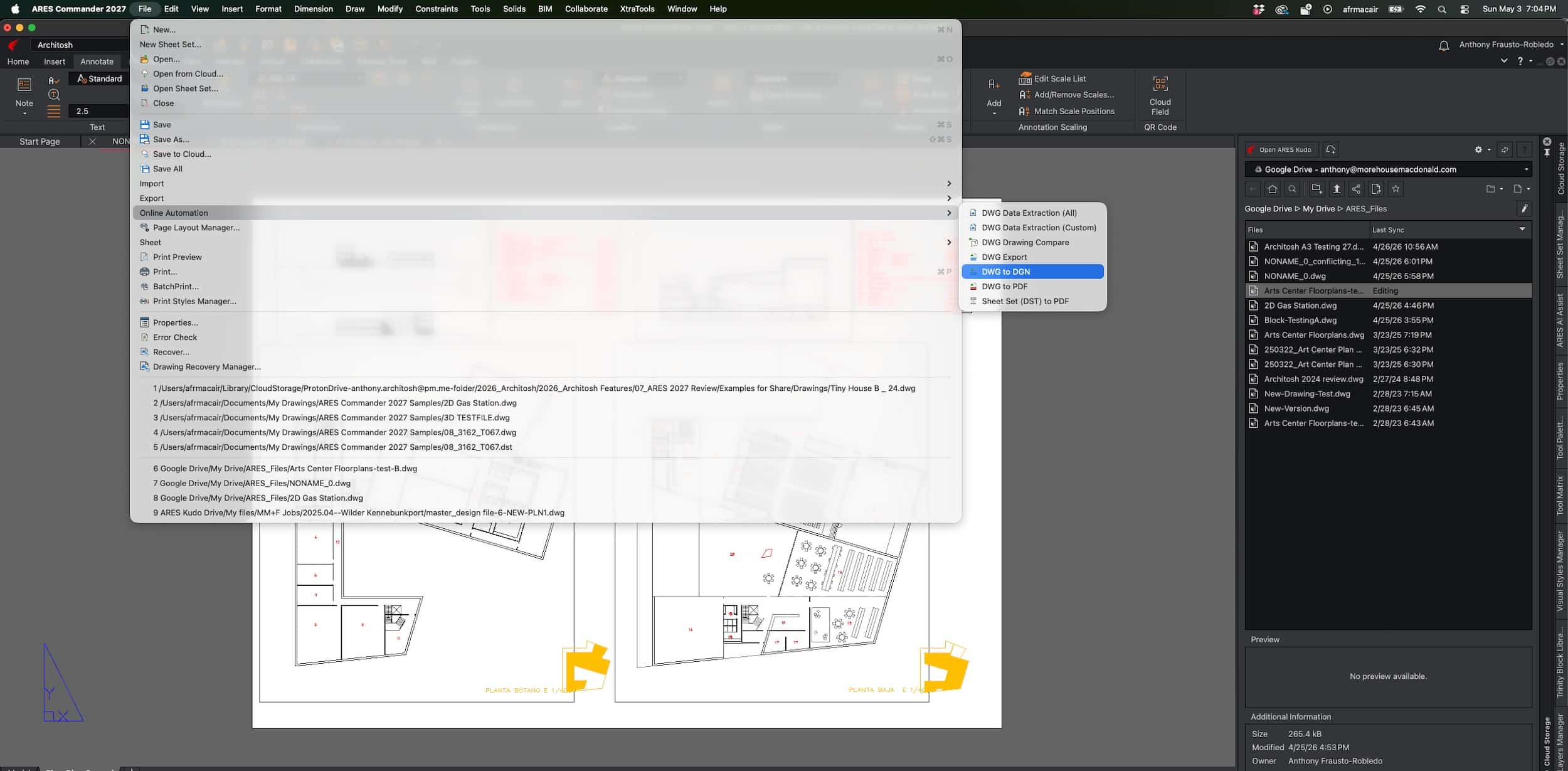
260 – The Menus method to activate drawings automations in ARES Commander 2027. You can also activate from the Cloud palette, which is also where you can implement the BIM-to-DWG automation process.
The first automation I tested was DWG to DGN, configured as a recurring scheduled conversion. I then performed an immediate DWG-to-PDF conversion. The automation job status appears on the right, while an Open in Browser button opens the automation jobs in the ARES Kudo cloud system. (see IMAGES 261-262)
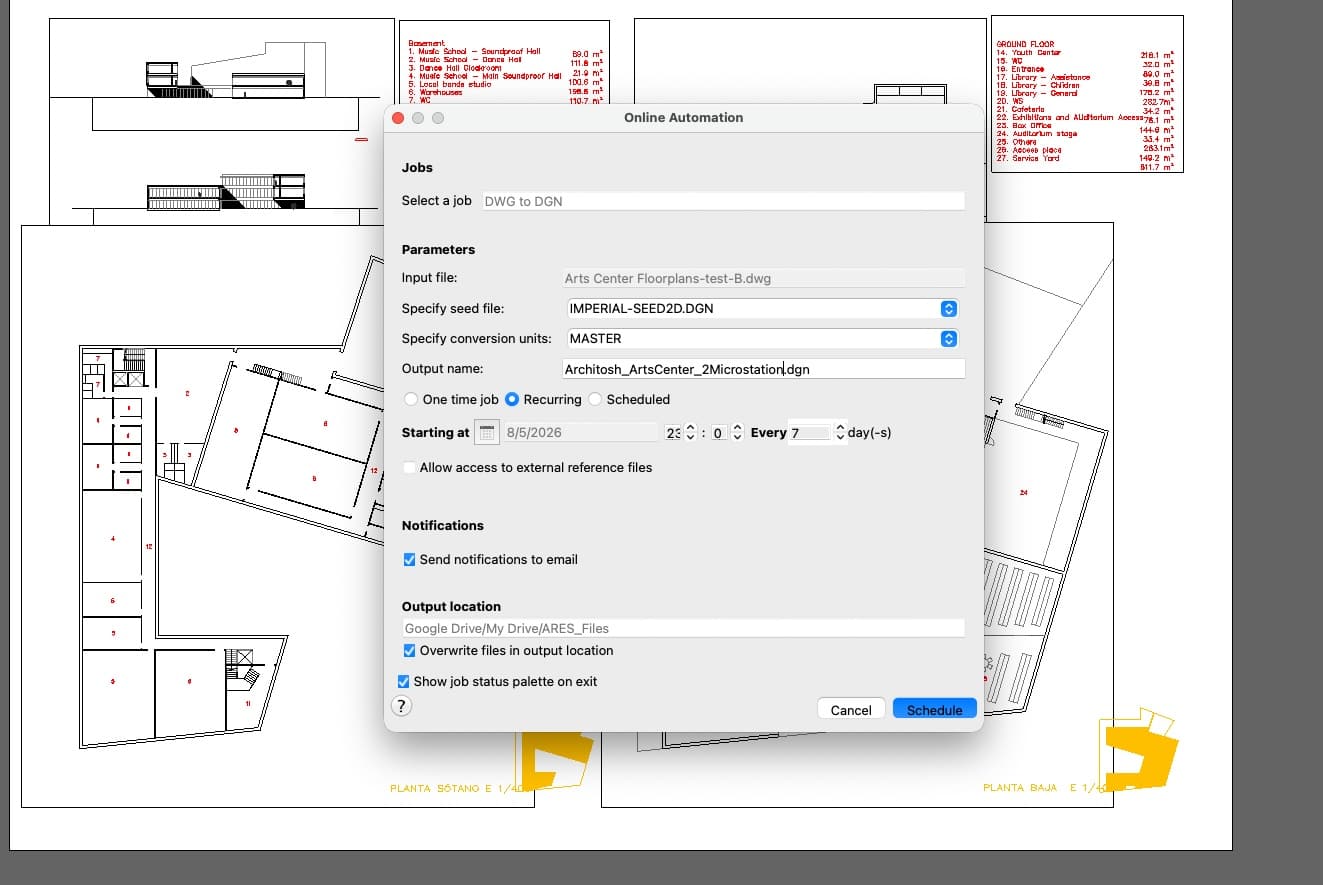
261 – Inside the drawings automation settings window. This is where you select your particular setup for your automation process.
We covered this window in detail last year as part of our ARES Kudo focus. (see, Architosh: “ARES Kudo adds BIM Drawings Automation and AI — Challenges AutoCAD,” 30 Mar 2025) Drawings Automation Jobs are listed with their template, job ID, status, creation time, and actions column. The status column provides a color-coded indicator, while recurring jobs are marked in orange in the template column. (see IMAGE 262)
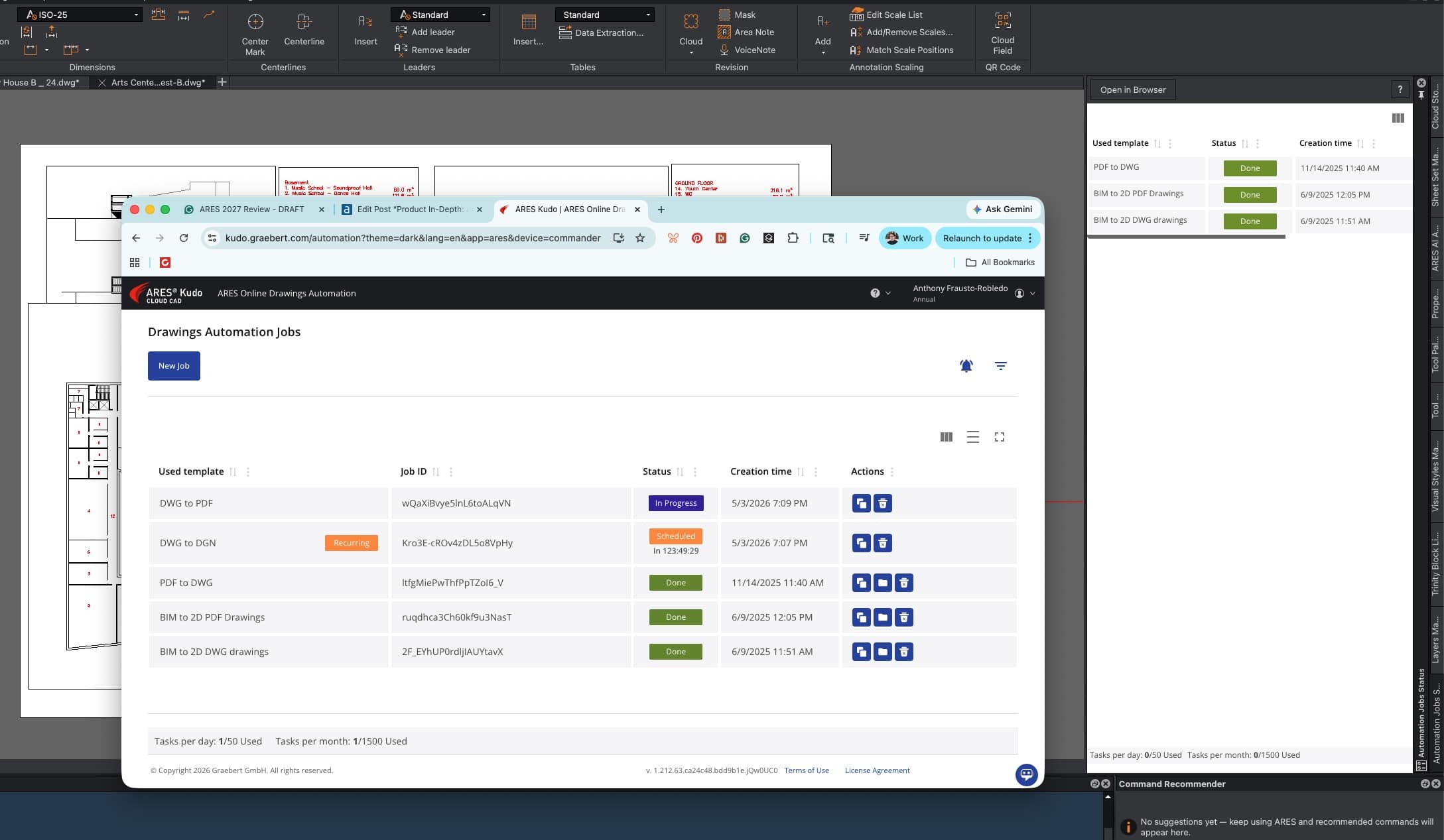
262 – Automations in progress with status indicators and more. This window’s functionality largely remains the same this year.
Users can also initiate drawing automation from the Cloud Storage palette. Right-clicking a selected file opens a drop-down menu with the same output options for Drawings Automation, including BIM-to-DWG automations.
Finally, ARES automations can notify users when a process is complete. In the images above, note the checkbox for email notification. This is what the resulting email looks like in your inbox. (IMAGE 263)
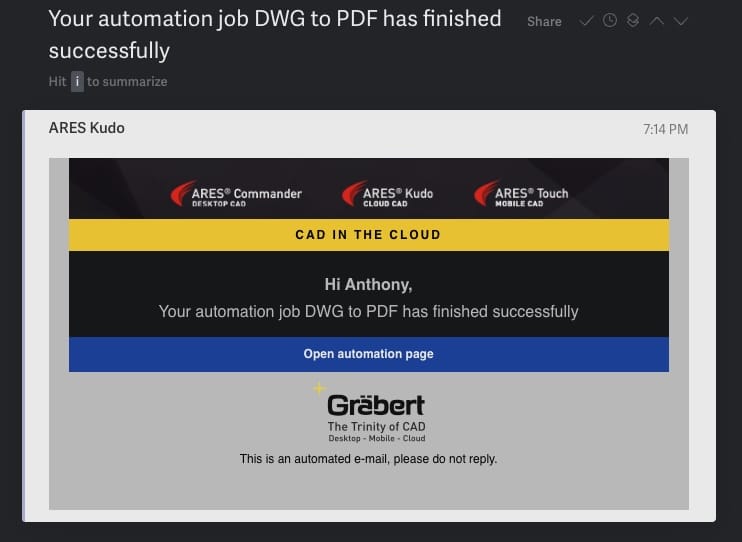
263 – Email notification that your drawings automation process is complete.
One final note: a new automation job type this year is Print Sheet Set (.DST) to PDF.
Advanced BIM-To-DWG: Multi-Discipline Support
One of Graebert’s unique features in ARES Commander has been its ability to ingest BIM files—Revit and IFC—and automatically create DWG drawings for documentation. For example, an MEP engineer working in 2D CAD with ARES Commander may receive a Revit model from an architect. The engineer can use ARES Commander to automatically create floor plans, exterior elevations, and sections, then develop MEP construction plans from those DWG files.
In previous versions, each new BIM file received from a project stakeholder or collaborator produced separate plans, generating redundancy. Now, ARES Commander manages linked BIM models from different disciplines as part of an integrated project. Users can also configure drawing generation to include only selected disciplines, such as Architectural + Structural or Architectural + MEP.
This better reflects real-world BIM coordination workflows based on federated model coordination. And a few final points. ARES 2027 this year supports Revit formats from 2011 through 2026. And it also works with IFC files. (see also Forma Integration section below).
Smart Linking
Also new in 2027 is Smart Linking technology, which optimizes path management for external references, or XREFs. ARES now alerts users when critical location changes affect referenced drawings. This provides a more proactive way to manage broken links before they impact workflows. Few things are as frustrating as broken references right when a drawing must be printed.
Part Four — Collaboration and Performance
ARES has strong collaboration features thanks to its Trinity concept, which enables cloud-connected workflows linking desktop, web, and mobile for better teamwork. Teammates can be on site using ARES Touch, adding input to files that colleagues can immediately address back in the office.
Across devices and operating systems, ARES offers multi-user collaboration with solid session handling, version control, password-protected and date-limited file sharing, plus commenting and markup features that include voice notes, stamps, and photos from mobile devices. You can read more here. (see, Architosh: “ARES Trinity — A Review of the Industry Leading DWG CAD Software,” 2 Mar 2023)
Autodesk Forma Integration
This year, the ARES 2027 ecosystem adds integration with Autodesk Forma Data Management, formerly Autodesk Construction Cloud. Like other cloud systems, Autodesk’s CDE—common data environment—can now store ARES DWG files. Users connect to Autodesk Forma from the Cloud Storage palette in Commander or through the ARES Kudo web interface.
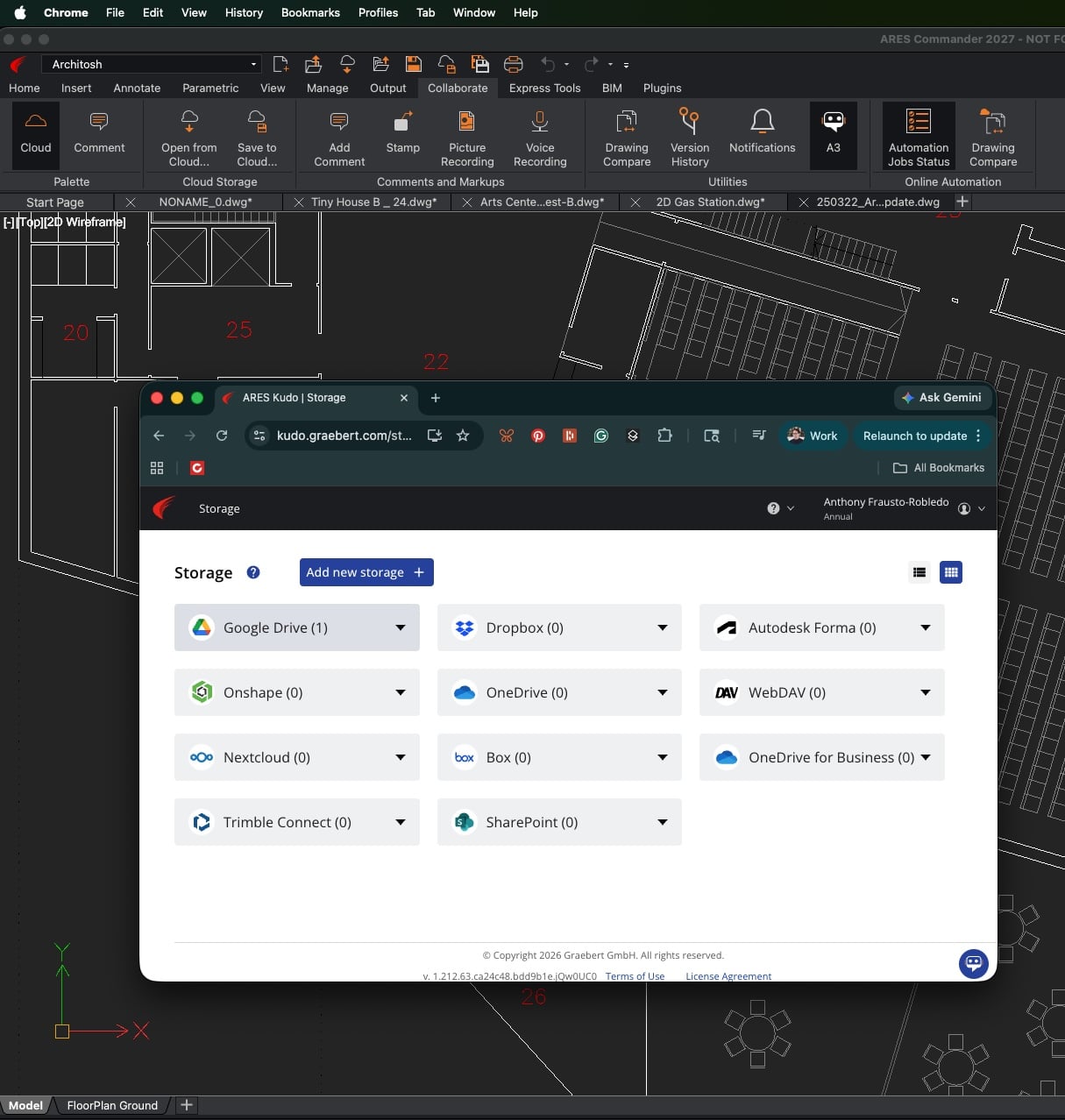
300 – Autodesk Forma integration.
Importantly, the Drawings Automation tools discussed earlier also work with files stored on Autodesk Forma Data Management. This includes automation of DWG drawings from Revit models in ARES BIM-to-DWG workflows. It also includes ARES’ BIM-to-DWG automation features. Revit files stored in Forma Data Management (FDM) can be linked to the BIM-to-DWG automation in ARES. When BIMRELOAD automates ARES, it produces new DWG files from the BIM model, and it can do this each time the BIM model is updated or whenever the automation is desired.
ARES Kudo Professional 2027 also supports connectivity to Autodesk Forma directly in the browser, including the free version, which supports viewing and commenting on files stored in Forma.
Drawing Insights in Kudo
Introduced this year, Drawing Insights helps users understand which collaborators have worked on files. Users can see who accessed, renamed, or shared a file. (IMAGE 310)
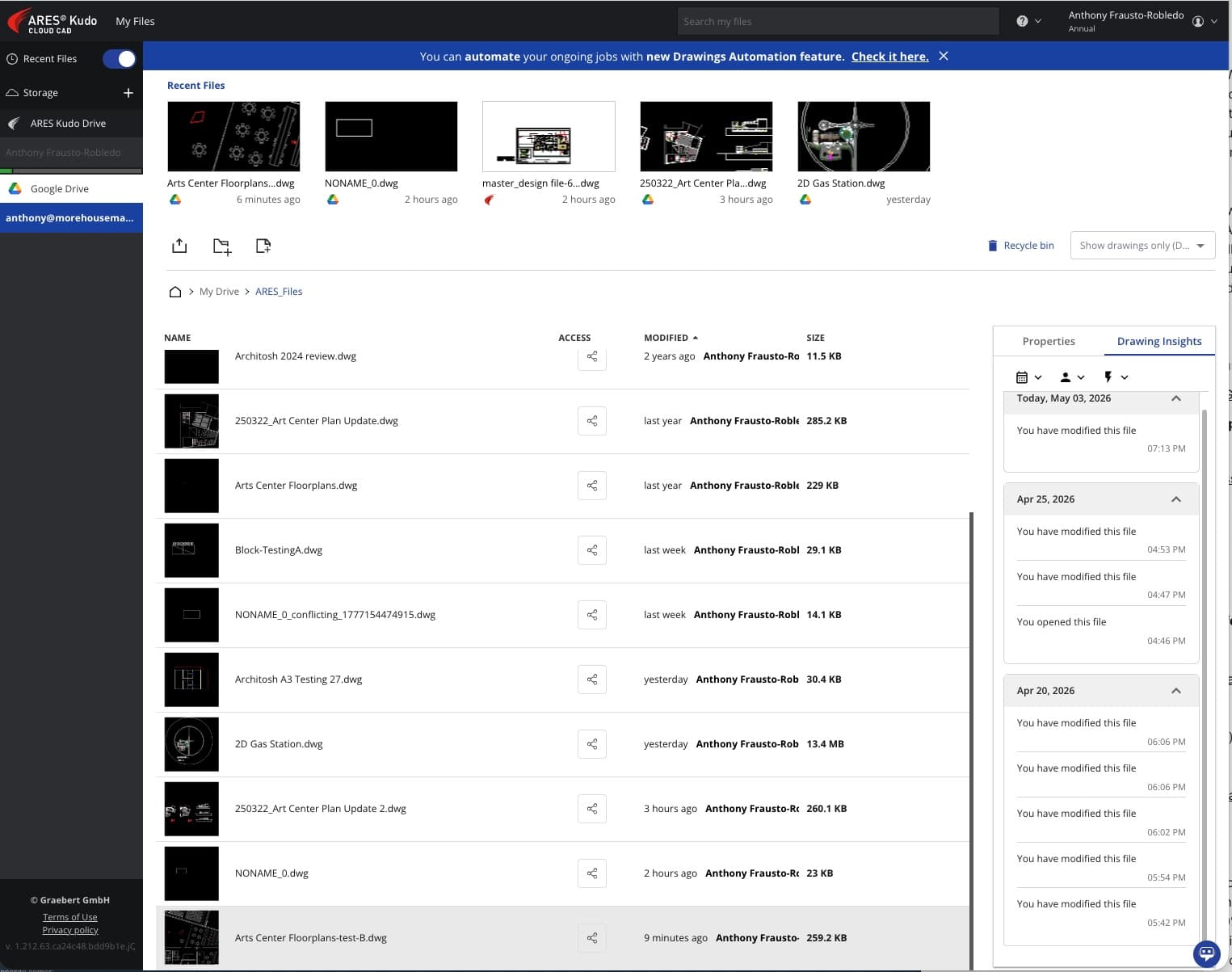
310 – Drawings Insights is a new feature this year in ARES Kudo Professional.
When a file is modified, Drawing Insights notes who modified it and the specific day and time.
Speed Gains
This year, Graebert says ARES Commander 2027 is dramatically faster than last year’s version. COPY operations are up to 50 percent faster, and version 2027 opens files up to 20 percent faster. The most noticeable gains, however, may come from 9–25 percent faster navigation.
For readers’ edification, in the CAD/BIM industry, the thresholds for perceived performance roughly break down as follows:
- Less than 10 percent — users may feel “placebo” speed gains; improvements are largely imperceptible.
- 15 percent — users notice gains in heavy commands, complex REGEN operations, or 3DORBIT workflows, but overall productivity rhythm remains similar.
- 20 percent — the “aha moment” or industry benchmark, where responsiveness becomes clearly noticeable.
- 50 percent or higher — transformative, often comparable to replacing a three-year-old workstation in the 1990s and 2000s.
This means ARES Commander 2027 delivers performance improvements at or above the “aha moment” level, especially on large and very large files. The larger the work, the more users will feel the gains. Zooming and panning are up to 20 percent faster on large drawings.
Commander 2027 also introduces extended multi-threading for SAVE, AutoSave, and CLOSE operations. These commands now run in the background instead of blocking the user interface.
AI and Admin Controls
A final note concerns collaboration within teams and organizations. Graebert has introduced a centralized administration layer for all AI features, addressing the primary concerns of enterprise CAD environments: security, privacy, and cost.
Area Note
AREANOTE was first released in ARES Commander 2027 SP0, was previously available in ARES Touch, and is now available in ARES Kudo.
The tool gives users a simple way to calculate areas quickly and represent them with color and variable transparency. Area regions can also be named, and their calculated area displayed, with user control over variables such as font size, color, and transparency.
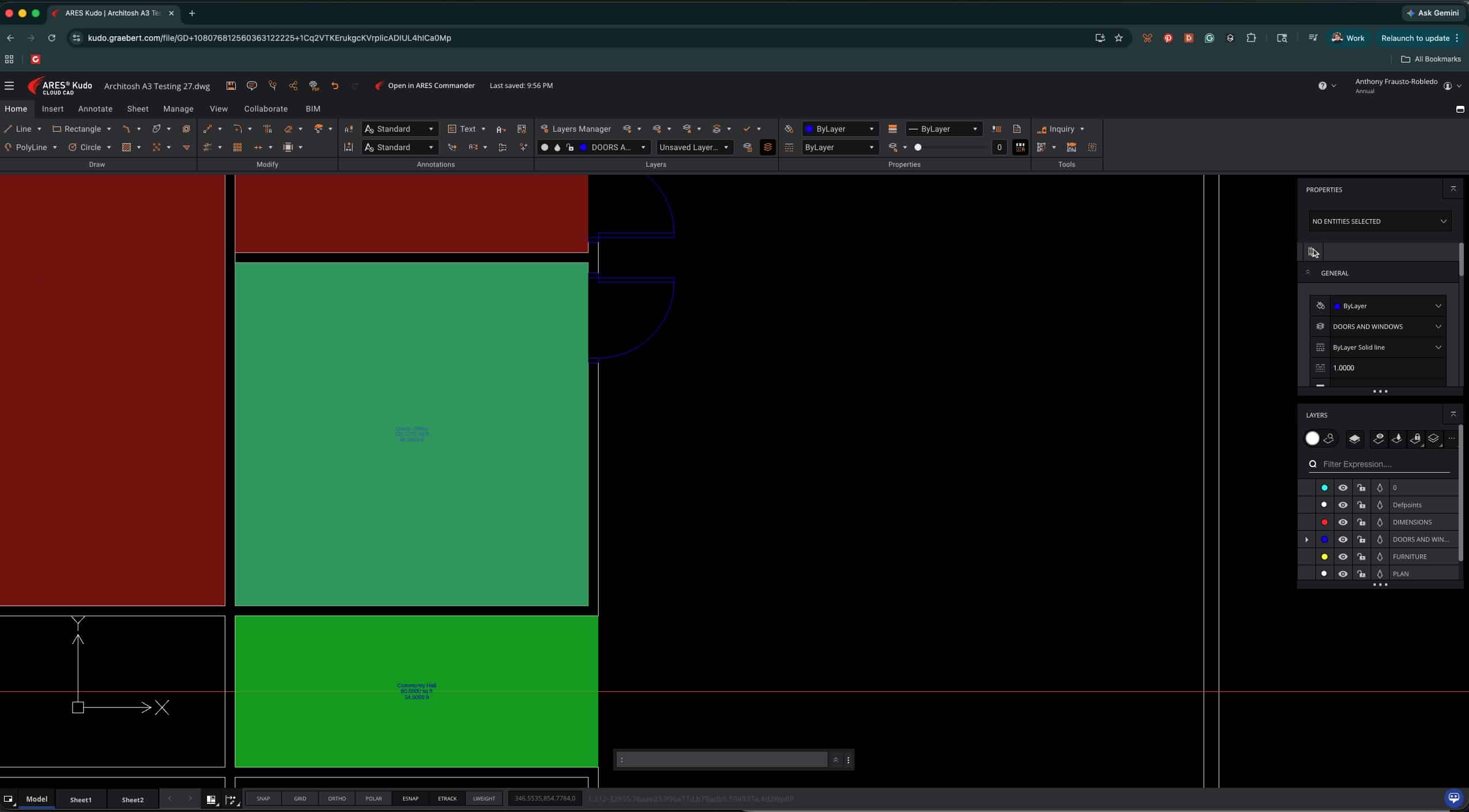
500 – AREANOTE is a new command for ARES Kudo Professional that allows the user to quickly calculate areas and represent them in color regions.
The image above shows the new feature in ARES Kudo Professional 2027, but the tool works the same way across ARES products.
Competing with LT — Support for Print Styles in ARES Kudo
We have written in the past that Graebert views ARES Kudo not as a competitor to AutoCAD Web, but as a full-blooded competitor to AutoCAD LT. Why? Two reasons. First, Kudo is far more feature-rich than AutoCAD Web. Second, Kudo is so feature-complete that, despite running in the browser, it essentially matches AutoCAD LT’s capabilities.
When these two products compete, ARES Kudo scores points by being cloud-hosted and offering cloud-specific features. AutoCAD LT scores points by handling much larger files faster, since it is not browser-based. But Kudo previously had one workflow disadvantage: no support for print styles. In ARES Kudo Professional, print styles are now supported.
ARES Kudo users can now take advantage of the new Print Dialog box, including print style support. With print styles, users can maintain one set of line colors for optimal screen contrast and another set for PDF-based printing.
Because AutoCAD LT supports equivalent plot style systems—CTB and STB—this was previously one disadvantage for ARES Kudo when competing for LT users. ARES Kudo Professional now supports both color-dependent CTB and named STB plot styles. It can create these styles anew and also ingest existing (.CTB) and (.STB) files from AutoCAD, helping ensure printed PDFs look as intended from the original AutoCAD setup.
ARES Kudo Professional lets users create, edit, and manage print styles—just like LT—not merely apply them, as in AutoCAD Web.
Finally, ARES Commander can now export drawings in STEP format, not just import STEP. This round-trip capability strengthens workflows involving SOLIDWORKS, Inventor, PTC Onshape, and other MCAD systems.
Closing Remarks
ARES 2027 shows Graebert continuing to sharpen its “Trinity” strategy around a unified CAD experience across desktop, web, and mobile. The practical value of this approach is not merely platform breadth, but workflow continuity: users can move between Commander, Kudo, and Touch with a consistent DWG-centric experience. That remains one of ARES’s strongest differentiators, especially for organizations that need flexibility across Windows, macOS, Linux, browsers, tablets, and mobile devices.
The larger story in this release, however, is AI. A3 is no longer just a help assistant that explains commands or points users toward interface elements. In ARES 2027, it increasingly becomes an active participant in the CAD workflow—selecting entities, modifying geometry, creating layers, responding to multi-step prompts, and even supporting voice-driven interaction in Kudo. AI-assisted block generation pushes this further by moving Graebert into generative CAD territory, where natural-language prompts can produce reusable vector-based drawing content.
The larger story in this release, however, is AI. A3 is no longer just a help assistant that explains commands or points users toward interface elements. In ARES 2027, it increasingly becomes an active participant in the CAD workflow…
ARES 2027 also strengthens Graebert’s competitive position through automation and BIM-to-DWG workflows. Bringing online Drawings Automation into Commander gives desktop users access to server-based batch processing, scheduling, recurring jobs, format conversion, and sheet-set PDF output without tying up local machines. Meanwhile, advanced BIM-to-DWG improvements—especially multi-discipline support and Smart Linking—make ARES more relevant to real-world federated BIM coordination workflows where not every participant works natively inside a BIM authoring tool.
Taken together, ARES 2027 is not a single-feature release but a strategic one. It advances AI, cloud automation, BIM interoperability, collaboration, performance, and Kudo’s ability to compete more directly with AutoCAD LT. Graebert remains a smaller player than Autodesk, but ARES 2027 demonstrates how a focused competitor can move quickly, differentiate boldly, and continue expanding what native DWG CAD can become in an AI-accelerated, cloud-connected era.