Germany’s Graebert has announced its new ARES 2027 product line, including its Trinity of CAD solutions for desktop, web, and mobile. These are manifest in the 2027 versions of ARES Commander (desktop), ARES Kudo (web), and ARES Touch (mobile). All of this across the widest set of operating systems and devices in the entire CAD industry.
This year’s release is quite large, with the global CAD/BIM company again needing over 100 pages in a PDF product brochure to review all the features. This has now happened three years in a row, a powerful indication of the pace and commitment to innovation from the Berlin firm.
What’s New: Highlights
ARES Commander this year focuses on multiple features of time-saving workflow enhancements. For example, the PROPERTYPAINTER command now allows users to copy properties from one drawing file to another. Select an entity in one file and copy it over to the entities in a separate file. This will be useful for those larger projects split across multiple files, as just one example.
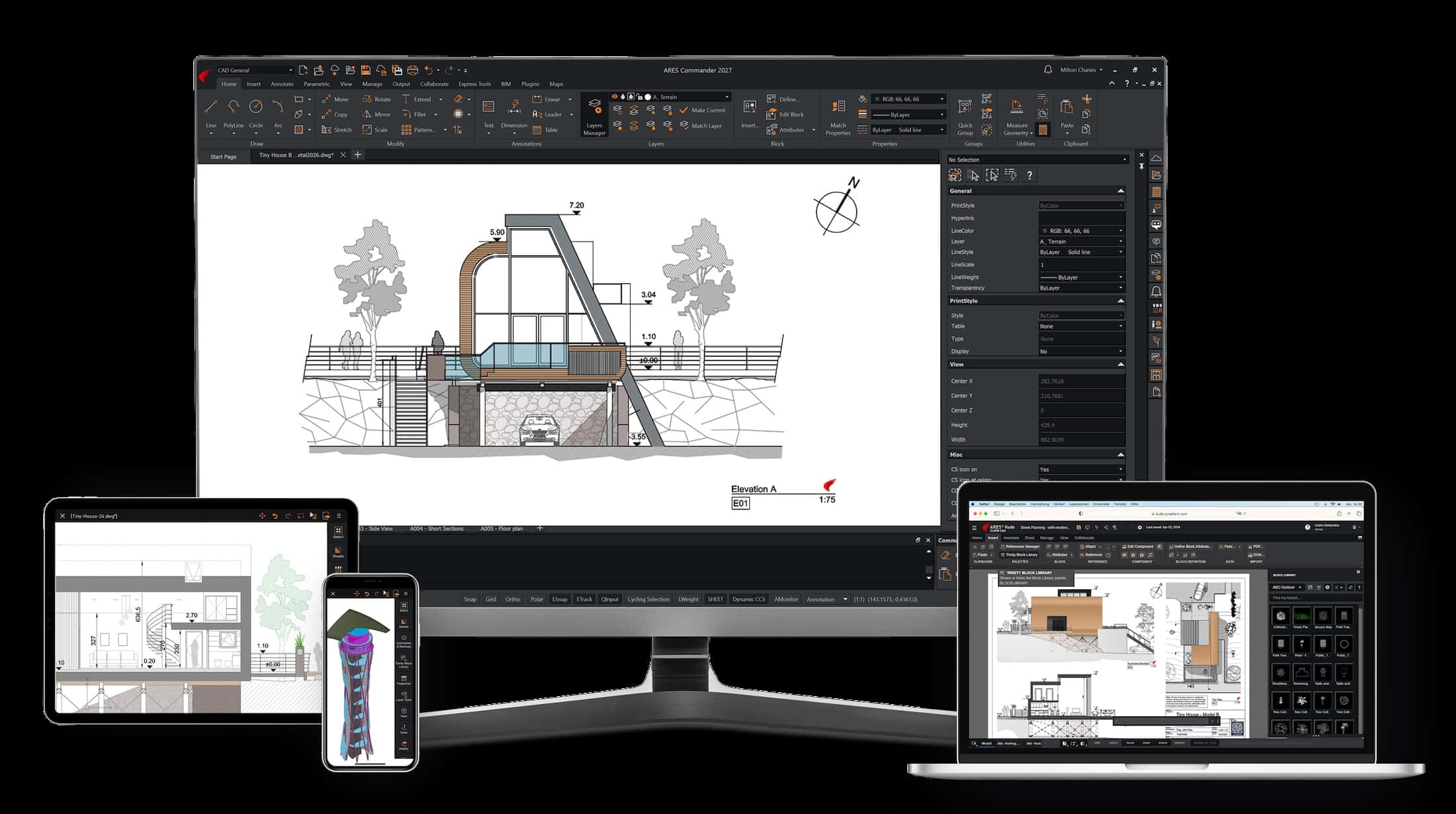
Graebert’s ARES 2027 ecosystem of DWG native CAD offerings span all compute platforms and devices and deliver impressive range of new AI features and Autodesk Forma cloud integration.
Another large improvement is optimized path management for XREFs. In version 2027, the software issues warnings automatically for critical location changes to referenced drawings and offers a batch workflow for correcting missing reference paths in a single step.
MVSETUP is a command familiar to AutoCAD users to create and align viewports (as in AutoCAD). This new capability also helps facilitate the transition to ARES Commander as well. This command automates key steps, helping users save time, maintain standards, and reduce setup errors.
MORE: ARES 2027 Deep Dive: AI, Automation and BIM-to-DWG Workflows
LAYTRANS is a new Layer Translator command. It lets you map layers — and entities belonging to these layers — from one drawing to another, and in doing so, translates their names and properties (such as color, line type, line weight, plot settings, etc) so that your drawing matches a desired layer standard.
These are some of the highlights in ARES Commander 2027, but there are many more as we discuss below and at the link here.
Performance Updates
And in this release, ARES Commander boosts performance by opening drawings 20 percent faster, and copy operations now run at 50 percent faster. Moreover, general navigation in the application is now 25 percent faster, and Save and Autosave run without blocking the interface.
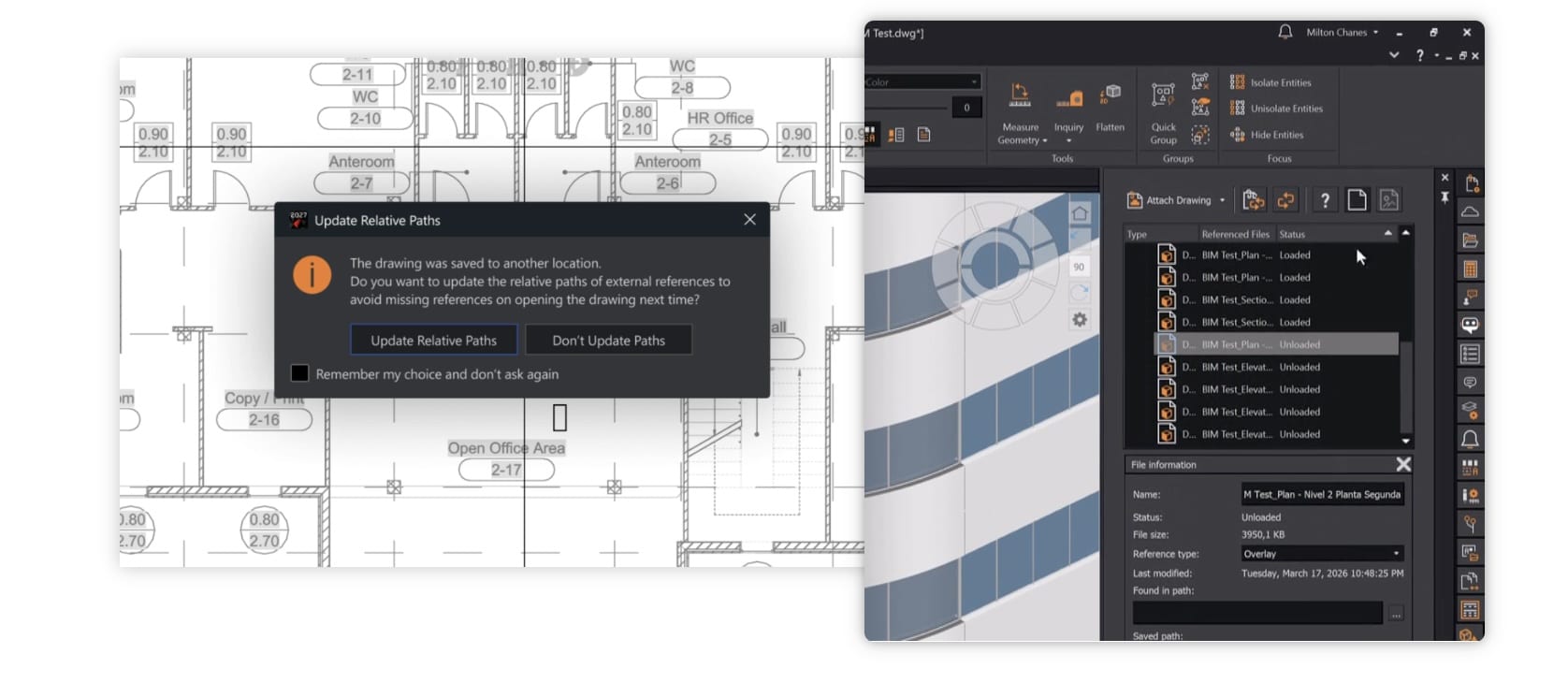
ARES Commander 2027 boasts new XREF features with new automatic issues warning system and batch workflow for correcting reference paths to external file resources in a single step.
These performance updates were calculated using over 65 reference files from 1MB to 167MB on five different hardware configurations compared to version 2026.
Graebert has also focused a lot this year on reliability, creating a rock-solid foundation. Version 2026 delivered 94 percent uptime (no crashes) for users.
ARES Kudo
ARES Kudo in 2027 has several new capabilities and enhancements. Kudo is a web browser-based DWG CAD system with a full set of 2D features unmatched in the CAD industry.
As the offering designed for CAD professionals on the go, one of the best new features is the AREANOTE tool, which allows users to quickly calculate areas from a region they define and visually communicate this region with colored and transparent fills, and labels showing the measured output. This is the same feature in ARES Commander, and it is also new in ARES Touch (see below).
ARES Kudo 2027 introduces a contextual ribbon for Hatch. This new dynamic interface adapts to the user’s current action, showing only the relevant tools directly on the ribbon.
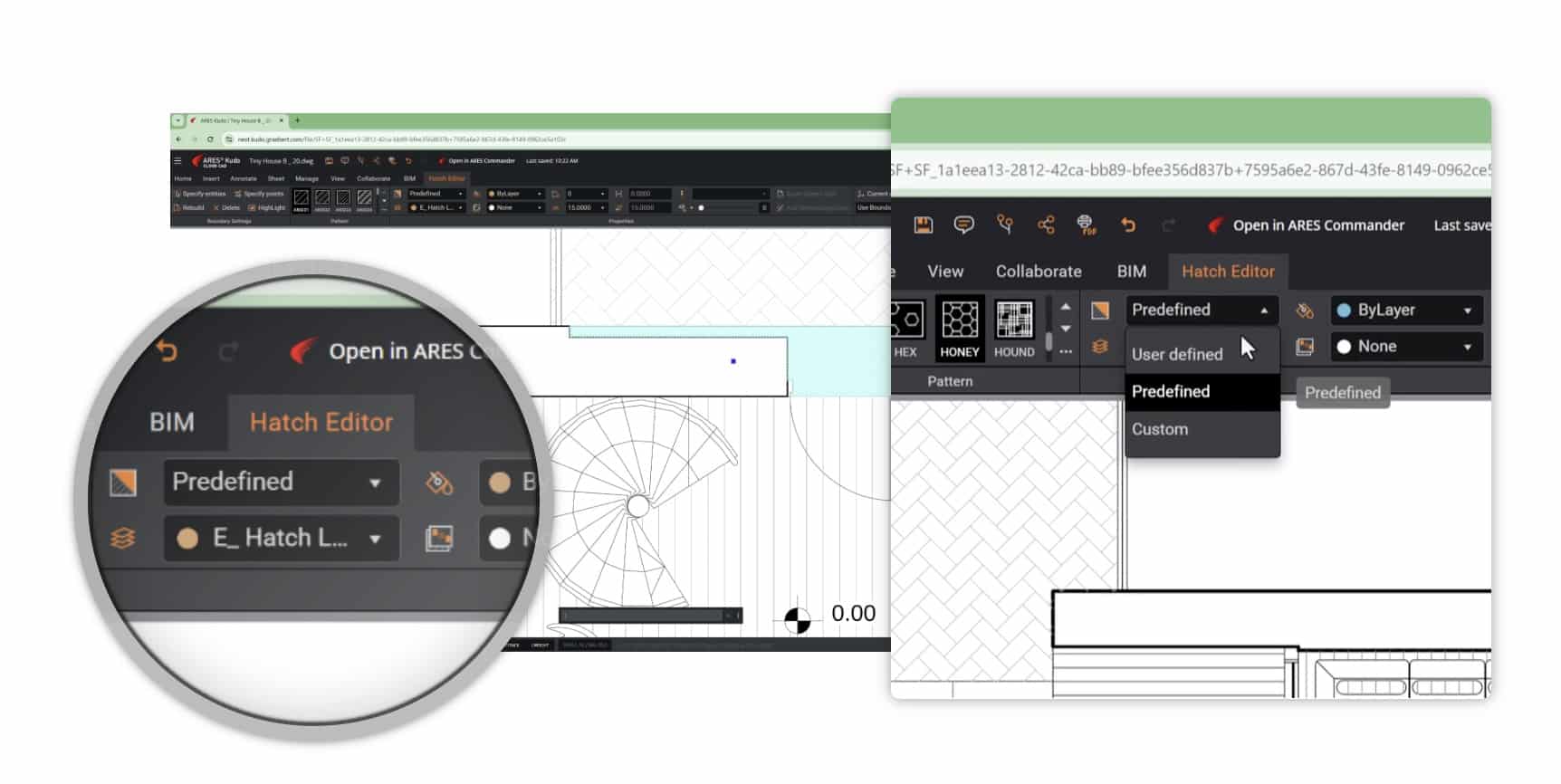
New hatch features onboard the latest 2027 ARES Kudo feature a new contextual ribbon that dynamically adapts its interface based on the user’s current actions.
Kudo 2027 gives users the ability to edit blocks directly from the Trinity Block Library, saving users time working with blocks in a file in order ot edit them and share such edits to teams. There is now an Edit button in the Trinity Block Library palette and an edit option in the contextual menu on the Resources page.
ARES Kudo 2027 also gains significant performance enhancements with faster file saves, undo, and thumbnails are generated more reliably.
Other new updates for ARES Kudo include Drawing Insights feature and the introduction of Quick Print to PDF and Print styles support.
AI and Automation for DWG
No area of innovation and new capabilities is greater in ARES 2027 than in the area of artificial intelligence. The new AI features are concentrated in ARES Commander and ARES Kudo.
A3, the name of ARES’s AI agent can now select, create, and modify DWG entities. The new technologies are powered by OpenAI, the company behind ChatGPT. These OpenAI technologies have been especially trained to help ARES users.
With the same prompt, users can use A3 to select and modify elements, including rotation, mirroring, scale, hatch, stretch, and delete. A3 can also make blocks. And A3 can now be used with user voice input in lieu of text prompts on ARES Kudo Professional.
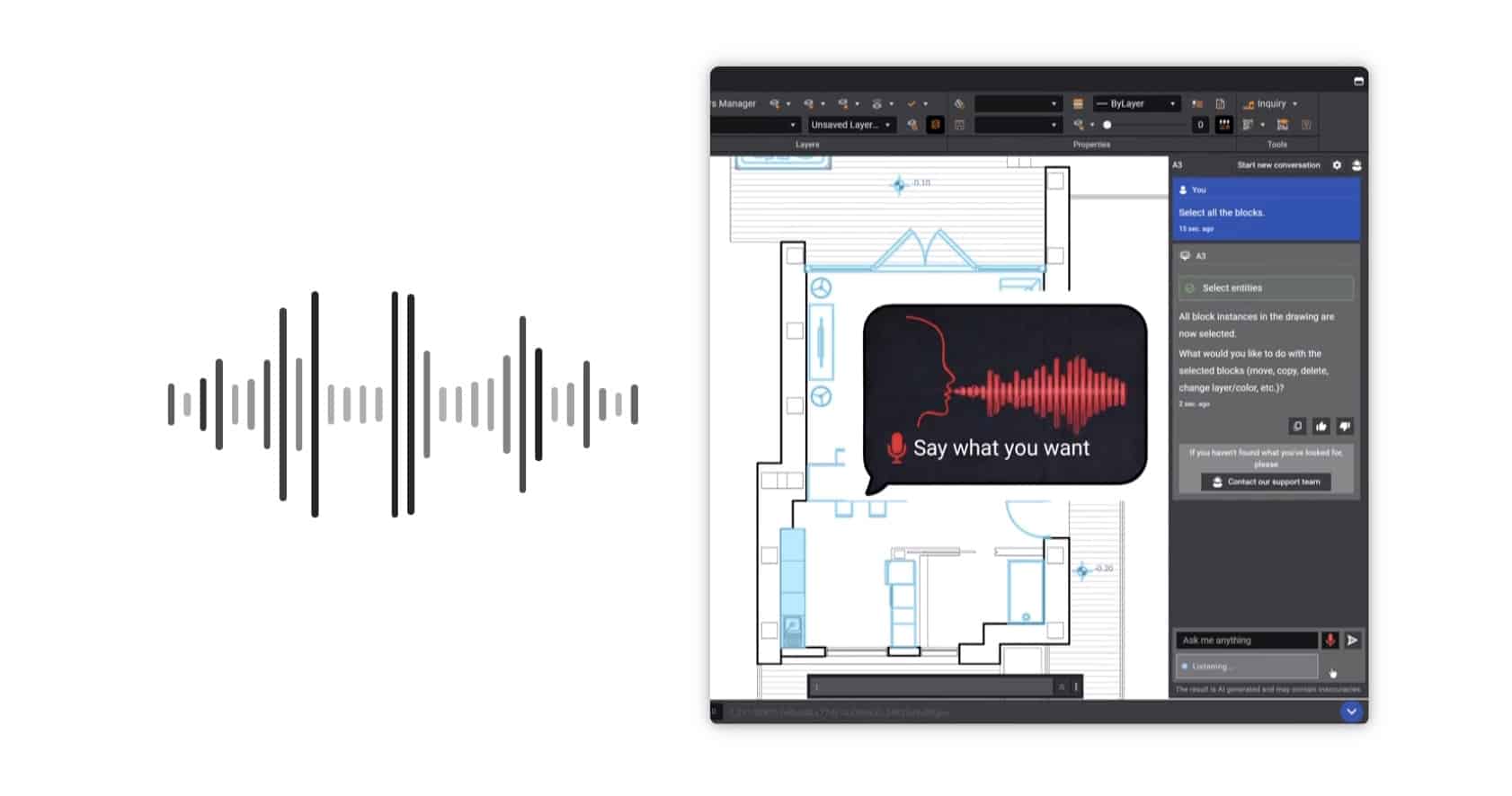
Users can use their voice for A3 (AI) input and talk to the ARES AI system rather than typing out text prompts.
There is also a new AI-powered command recommendation system that analyzes what the user is doing and suggests the next commands. The system also learns your work patterns and builds an adaptive profile.
Users will also have AI-driven block generation in the ARES Trinity Block Library. You can essentially describe what you want, such as a door swing, a table, or a power outlet, and the system will generate an accurate, standards-aligned symbol for you.
In the domain of Drawings Automation — a focus area where Graebert already has a strong industry lead — ARES 2027 now places these capabilities (which existed in previous versions in the cloud) directly inside ARES Commander 2027. The work itself is still offloaded to the ARES cloud, where it is processed. This includes batch-processing, scheduling, and recurring jobs. As an example, you can schedule to have your DWG converted to a PDF every night with the output saved to a particular cloud storage folder.
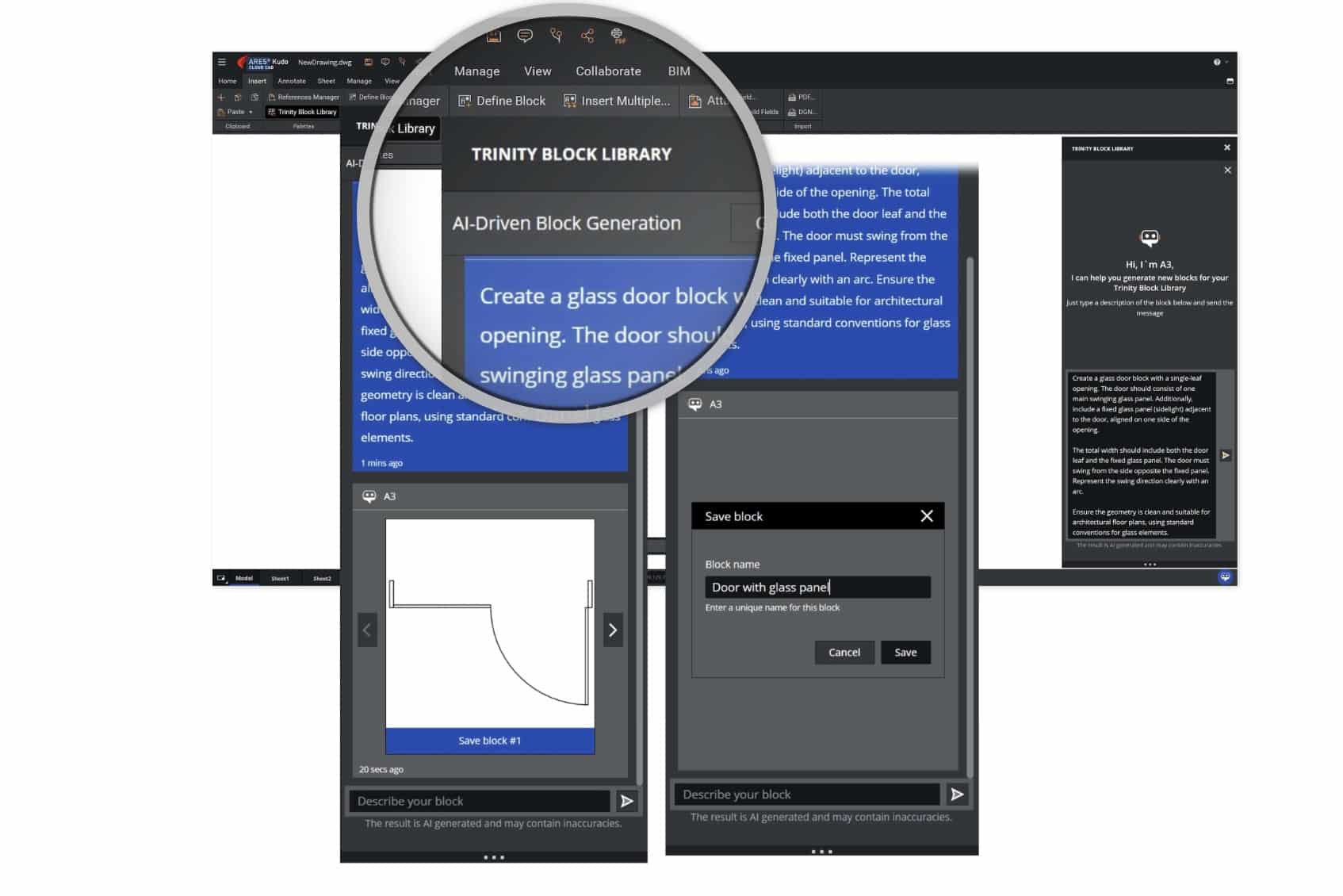
AI can be used inside the Trinity Block Library to create blocks for the user based on prompt input.
These automations can happen on files stored in common cloud storage providers, rather than in ARES Cloud folders. These new features are available in the Cloud Storage palette. Say, if you use Dropbox, you can right-click on a PDF file and select Convert to DWG. The automation tools will then perform the PDF-DWG conversion. Finally, users have one additional automation job type available to them—Print Sheet Set (.DST) to PDF.
Some of the AI features noted above are in Commander or Kudo only, but many are in both, and some were there before in one product and have now been added to the other product. For example, AI-driven Text Tools was previously in ARES Commander, but is now in ARES Kudo. Kudo’s MText editor has been expanded with AI tools to help translate, refine writing, check spelling, and summarize text.
BIM to DWG Automation
Graebert has had BIM-to-DWG automation technology for several years now, but this release continues to evolve it. These features are available in both Commander and Kudo in various ways. The core automation ingests either Revit or IFC files and generates floor plans, sections, and elevations in DWG files for further editing. It also automatically generates labels for rooms, doors, and windows.
New this year is the ability for ARES Commander to manage linked BIM models from different disciplines as part of an integrated project. This means BIM models from MEP and structural professionals and architects can all be linked into an integrated project and avoid duplicating plans, for example. And users can select the disciplines they want to work with, like a coordinated architecture + MEP plan or similar with structural.
Autodesk Revit 2026 is fully supported and ARES supports versions back to 2011.
Autodesk Forma Connection
The BIM automation features work with connected cloud storage providers such as Dropbox, Box, Google, OneDrive, et cetera, but now you can connect to Autodesk Forma Data Management (formerly Autodesk Construction Cloud).
Both ARES Commander and ARES Kudo can save and synchronize with your project folder in Forma. This includes the previously mentioned drawing automations. They too can be run connected to Forma.
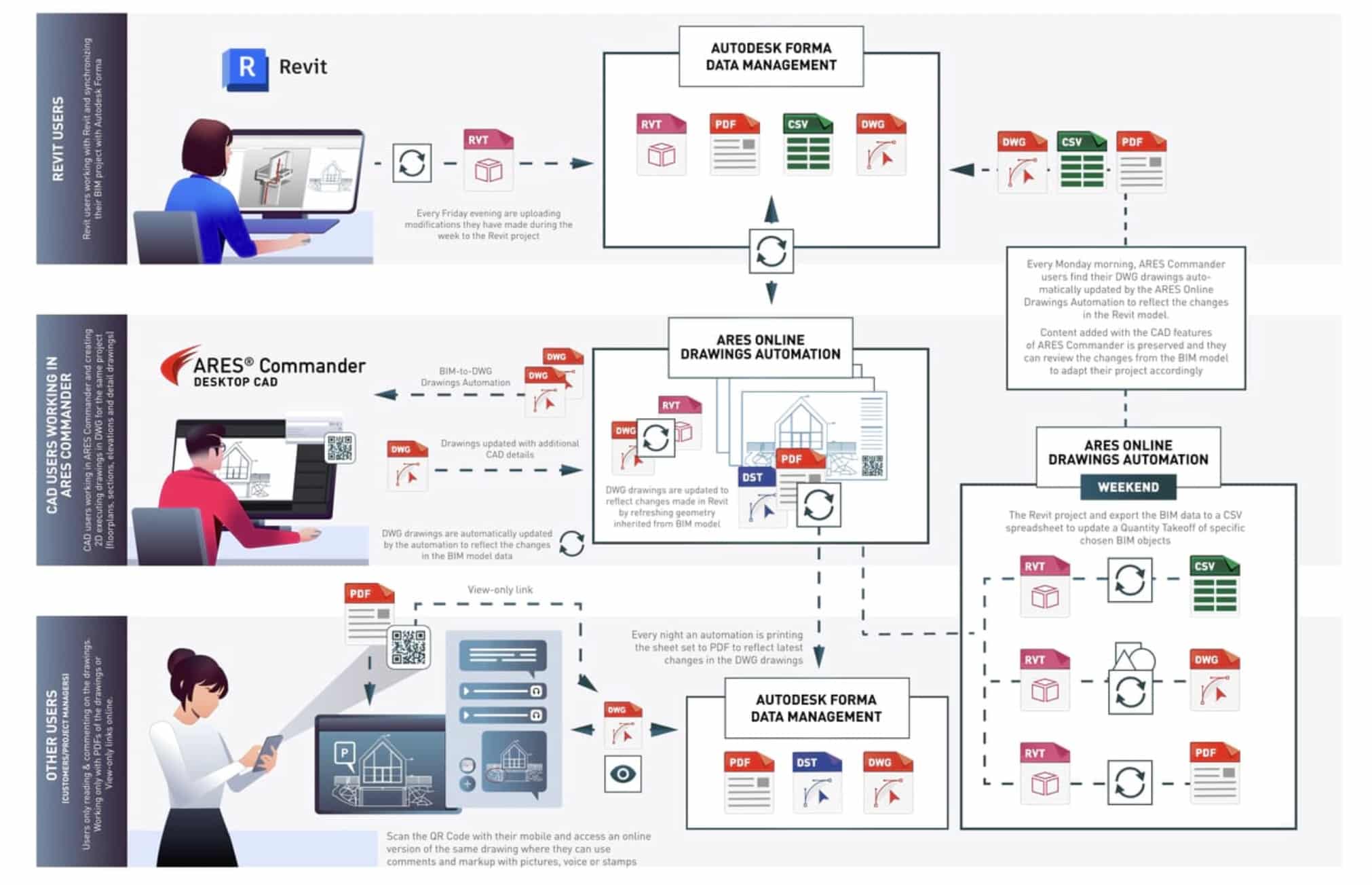
We know of several AEC software companies with new Autodesk Forma connections coming out this year but Graebert is delivering that capability first with ARES 2027. This document highlights ARES workflows that engage with Autodesk Forma Data Management (formerly ACC).
The entire integration with Forma can be explored in an enlarged infographic that you can find here.
And there is a lot more to say about the BIM-to-DWG drawings automation features in ARES 2027, so we’ll dive in deeper in a separate report.
Cloud-based Collaboration
We have written extensively about ARES Trinity before—the cloud-based collaboration layer that connects ARES Commander to ARES Kudo to ARES Touch. Now all three of these tools can connect with Autodesk Forma, in addition to existing support for Google Drive, Dropbox, Box, OneDrive, and Microsoft SharePoint.
This new integration with Forma means Graebert’s own DWG native tools can work directly with DWG files stored in the Forma CDE (common data environment). All of Trinity’s collaboration features are accessible with files stored in Forma, including session handling and take-over editing session controls, plus version control, markups, comments, and secure sharing.
Autodesk Forma integration extends to the free version of ARES Kudo as well.
ARES Kudo (Free)
ARES Kudo is a powerful online CAD application that this publication in the past has compared to Autodesk AutoCAD LT with feature parity plus unique ARES cloud features.
The free version of ARES Kudo offers the AEC market a compelling native DWG file viewing application with built-in commenting, plus limited access to cloud-based drawings automation features.
Other New Items
As you can see from our highlights of features, ARES 2027 is a massive update with dozens of major new features. However, we need to discuss Flex Cloud licensing improvements. Graebert already provides the CAD industry’s most flexible and extensive licensing arrangement offerings, but its Flex Cloud licensing is ideal for organizations with multiple team members working with CAD at various levels within the week. These licenses can be shared between concurrent users or computers to reduce the number of licenses and costs.
New in 2027 for Flex Cloud licensing is automatic license return. The license is now immediately returned to the cloud licensing pool once the user quits the application. And there are improvements with Internet disconnection scenarios.
Admin-level settings are now set in an Admin Space in the Graebert Customer Portal. AI features can be centrally managed. And there are several other improvements with regard to administration functions like licensing and networks, plus new online help resources and more.
To read all about these features in greater detail with copious images, visit the ” What’s New with ARES 2027 page.
Architosh Analysis and Commentary
In this year’s updates to ARES add considerable additional AI and automation features, in addition to numerous efficiency and core CAD capabilities. Even seemingly small things are not so small such s the dynamic ribbon for hatches in ARES Kudo. I really surprising and big change for Graebert’s ARES this year is the deep integration with Autodesk Forma Data Management (formerly ACC). The depth of integration is compelling and of big benefit to actually both companies. The Forma cloud openness we are beginning to see this year is making Forma much more compelling to AEC workflows than just what Autodesk delivers itself.
Architosh will be doing a big review of ARES 2027 this month (not sure of the details just yet) so we will report more soon in much greater detail, typical of our in-depth product reviews.