The Nemetschek Group’s Bluebeam brand may have a serious new competitor. Enter Notch, a new AEC software startup with the brand tagline, “Everything Bluebeam does without the bloat.” For Mac AEC pros desperately missing the native Mac Revu days, Notch is going to have instant appeal.
Mac Native
When Bluebeam decided to stop the native Mac version of Revu after it had been out for a few years, they came to Architosh to look for an exclusive story—how to communicate to the Mac faithful that a future in the cloud would justify a limited life for Revu for Mac, which would no longer be updated. (see: Architosh, “Exclusive: Bluebeam Dropping Mac Platform—Pushing Cloud Ecosystem Instead,” 4 Mar 2019) The Mac faithful in AEC took this badly. Some of its sister companies with strong Mac bases actually encouraged me to try to get Bluebeam to make a native Mac Revu again.
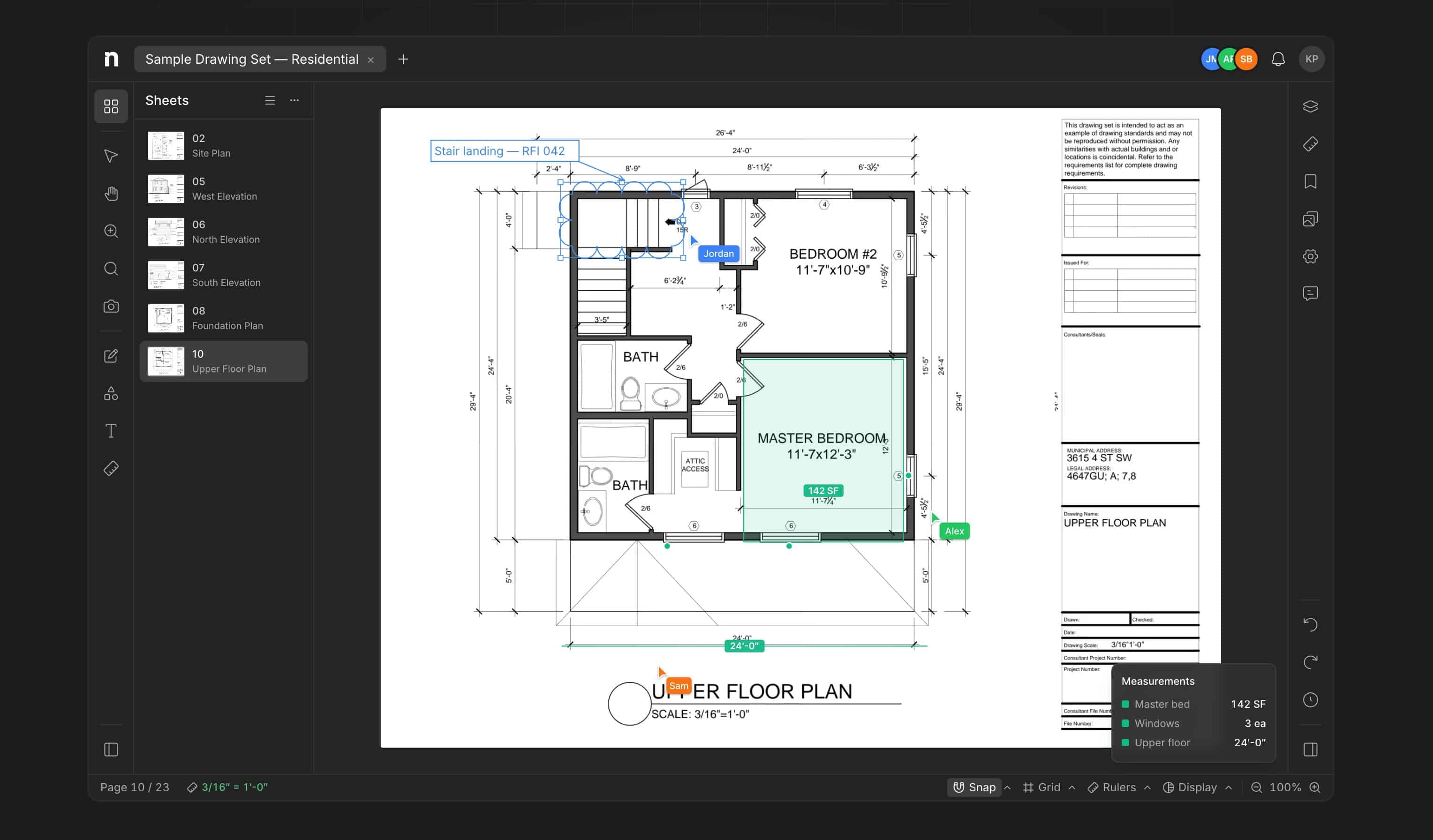
Notch is a new AEC-industry focused PDF markup and collaboration tool in the cloud and on Apple devices including Macs. The innovative AEC startup’s omission of a native version for Windows is a shocking move, but the full version is also in the cloud, unlike Bluebeam Revu. See our analysis below.
And to make matters worse. Apple introduced Apple Silicon in 2020 and suddenly took a massive leap in chip performance in the overall computer industry. Suddenly, MacBook computers were everywhere as the Mac market share began to grow at its fastest clip in decades. And for good reason. For an AEC field-based workflow, there is no close substitute for the Mac for industry-leading performance-per-watt and all-day battery life.
Now someone has addressed the gap—the lack of a Mac-native PDF markup tool for AEC.
A Twist of Fate
And in a not-so-surprising twist of fate, Notch is only native for Mac, not Windows. The new AEC startup is already claiming bigwig AEC companies as customers, including Turner Construction and AECOM.
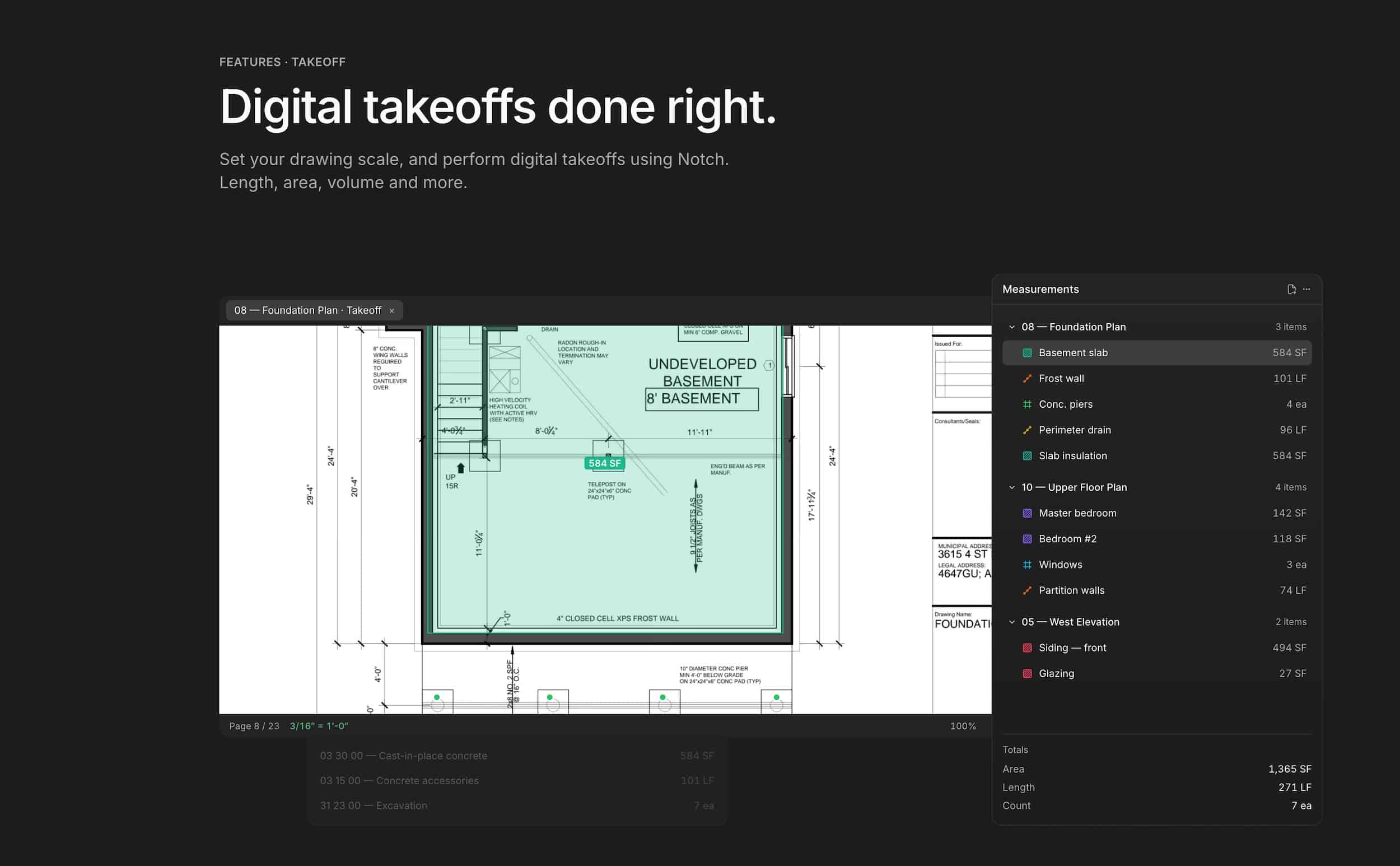
Like its primary competitor, Bluebeam, Notch focuses on solid take-off tools for construction professionals. It uses AI to detect the scale of drawings upon upload, saving users time.
Notch delivers markup, measurement, collaboration, and more in a modern PDF editor built for design, architecture, engineering, and construction teams. While we have not yet talked to the Notch folks, the website says there are over 150 PDF editing tools. You can work with colleagues on the same PDF at the same time, like a modern BIM 2.0 tool such as Arcol. And you can integrate Notch with your cloud file storage systems like Box, Dropbox, SharePoint, Drive, and OneDrive.
Notch Features include:
- Markup documents — with clouds, callouts, stamps, text that stay editable and never flattened into the PDF
- Build take-offs — set scale, create runs, areas, pull lengths, etc and export to Excel
- Compare revisions — lay one revision over the other to run the Compare function to get a color-highlighted compare document
- Layer-based disciplines — each discipline or scope can have its own layer
- Control the look and feel — users can adjust color, border, fill, and hundreds of details throughout the property panel
- Manipulate documents — merge separate PDF documents, extract pages into separate documents, reorder, rotate, and rename pages within PDF documents
- Quick access — add bookmarks and manage massive PDF files with thumbnails, titles, and integral search
- Live multi-user collaboration — everyone on the same document at once, separate colors for users’ cursors — comments and markup land live
- AI agents — Notch features AI agents which can read documents and provide answers about what it understands
- Scale detection — when uploading documents, each page is reviewed, and the scale is automatically identified
- Tag AI — users can use the AI agents for collaboration using @Notch in the comments
In addition to these features, users can add custom stamps for shop drawings and other review processes. Quantifications land in a spreadsheet in one click. And paying users can share documents for others to review with no restrictions (unlimited viewers). One other thing is that users can email PDF documents to their Notch workspaces.
Finally, Notch works with Egnyte as of September. The Notch to Egnyte Connection enables markup of documents stored in Egnyte and then publishes them back to Egnyte once the markup is complete. If you read the Blog here, you can learn more about Notch.
Focused on Bluebeam and Adobe
The Notch teams seem intent on making sure that Notch is meant to compete with Bluebeam and Adobe. It is the first question in their FAQ. In terms of platform support, what is very unique about Notch compared to Bluebeam, in particular, is the role reversal on the desktop. There is no Windows version for the desktop. Windows users access and work on Notch using the web browser version or mobile versions.
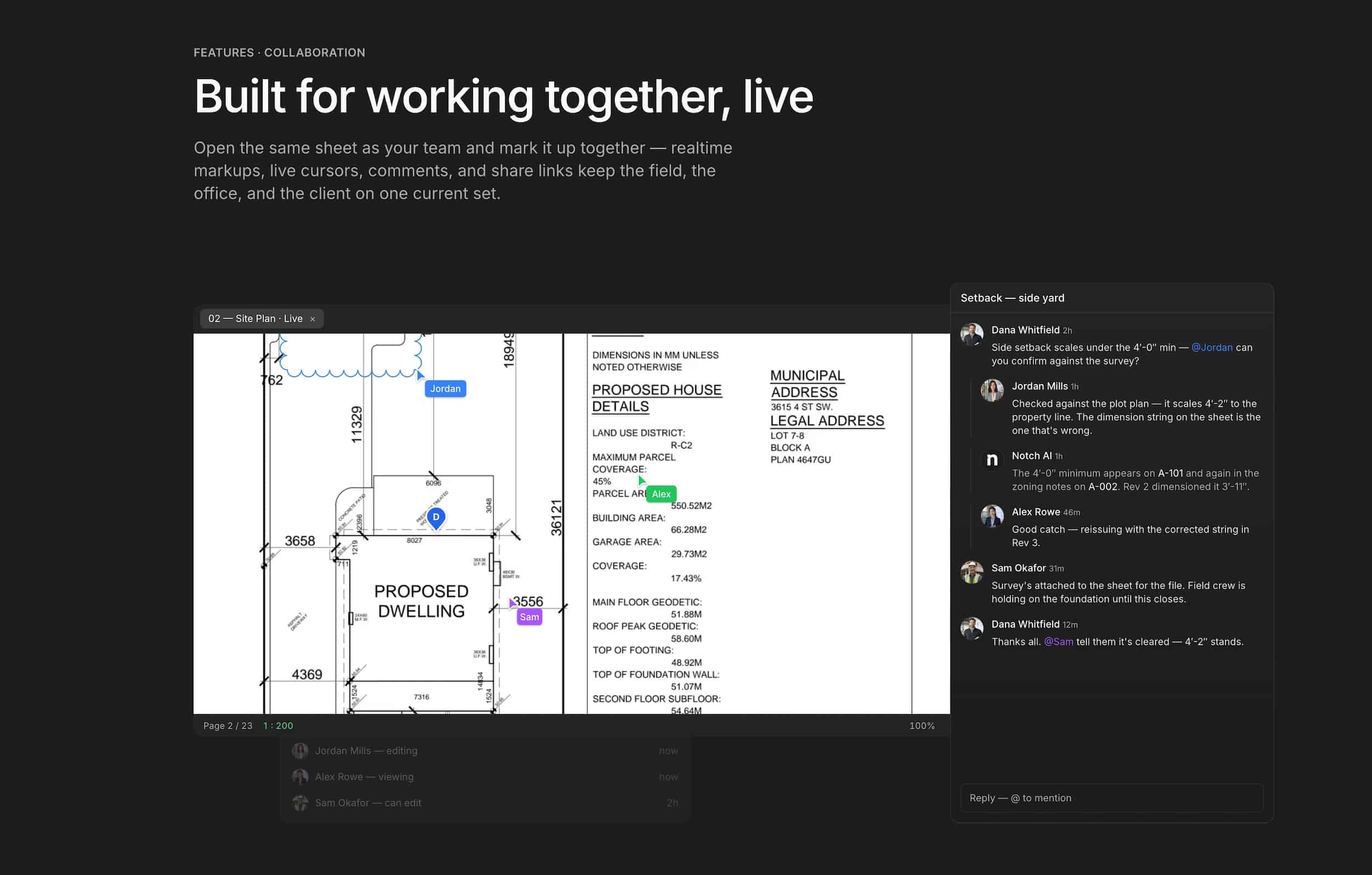
A truly distinguishing feature of Notch is the real-time, multi-party (user) markup and collaboration, à la Figma.
Both iPhone and iPad have supported versions, plus Mac and the web browser. There is a Free Forever plan that works and supports up to 250 MB of documents, a Solo Plan at USD 8.00 per month, and a Pro Plan at USD 16.00 per month (based on annual billing). Only the Pro Plan supports the live multi-user commenting capabilities. Readers can test the Free Plan without a credit card.
To learn more, visit them here: https://notch.build/
Architosh Analysis and Commentary
We always wondered if not having a native Revu on Mac would open the door for a new Bluebeam competitor, and it appears it has. The Mac doesn’t seem like the core reason for Notch’s existence, as it clearly offers numerous cutting-edge features in its early debut. However, the fact that there is a Mac desktop version but not a desktop version for Windows, and both iPhone and iPad versions, is a telling perspective about this company’s orientation as a developer. Notch may be the first AEC industry application of substance—in a very long time—that has put the Mac ahead of Windows.
Since learning about Notch only in the past 12 hours, we have opened an account and begun exploring the application (just in the browser for the moment). The first thing that surprised us is the speed. We uploaded a rather good-sized set of full construction drawings (PDF files), and not only was the upload quick, but the appearance of the sheets and thumbnails was also super quick. The AI system also detected the drawing scales correctly. We look forward to diving in more on this new AEC markup tool and reporting back.