Spring is when Autodesk makes its general big updates across its flagship AutoCAD and Revit product lines, along with AEC industry cloud and related solutions. Architosh has already covered the new AutoCAD 2027 and its latest innovations. In this article, we look at what is new with the annual update to the world’s most popular BIM application.
New in Revit 2027
Revit 2027 focuses on three primary areas: AI and data-driven BIM, production efficiency, and a modernized experience, which includes UI improvements.
Key Takeaways
- Autodesk Revit 2027 features on-board MCP (model context protocol) AI technology to enable context-aware AI.
- Autodesk Assistant can perform common workflow tasks, like finding and tagging elements, generating views and schedules, and more.
- Revit 2027 features deeper connectivity with updated Forma Cloud offerings
- Accelerated Graphics is no longer in tech preview—Section Box offers real-time graphics
Revit 2027 now features Autodesk Assistant, an AI text prompt tool that leverages MCP technology to help you implement a large array of BIM functions, from finding and tagging all elements of a certain type, to generating certain views and organizing schedules, to providing in-product guidance to complete tasks and resolve issues.
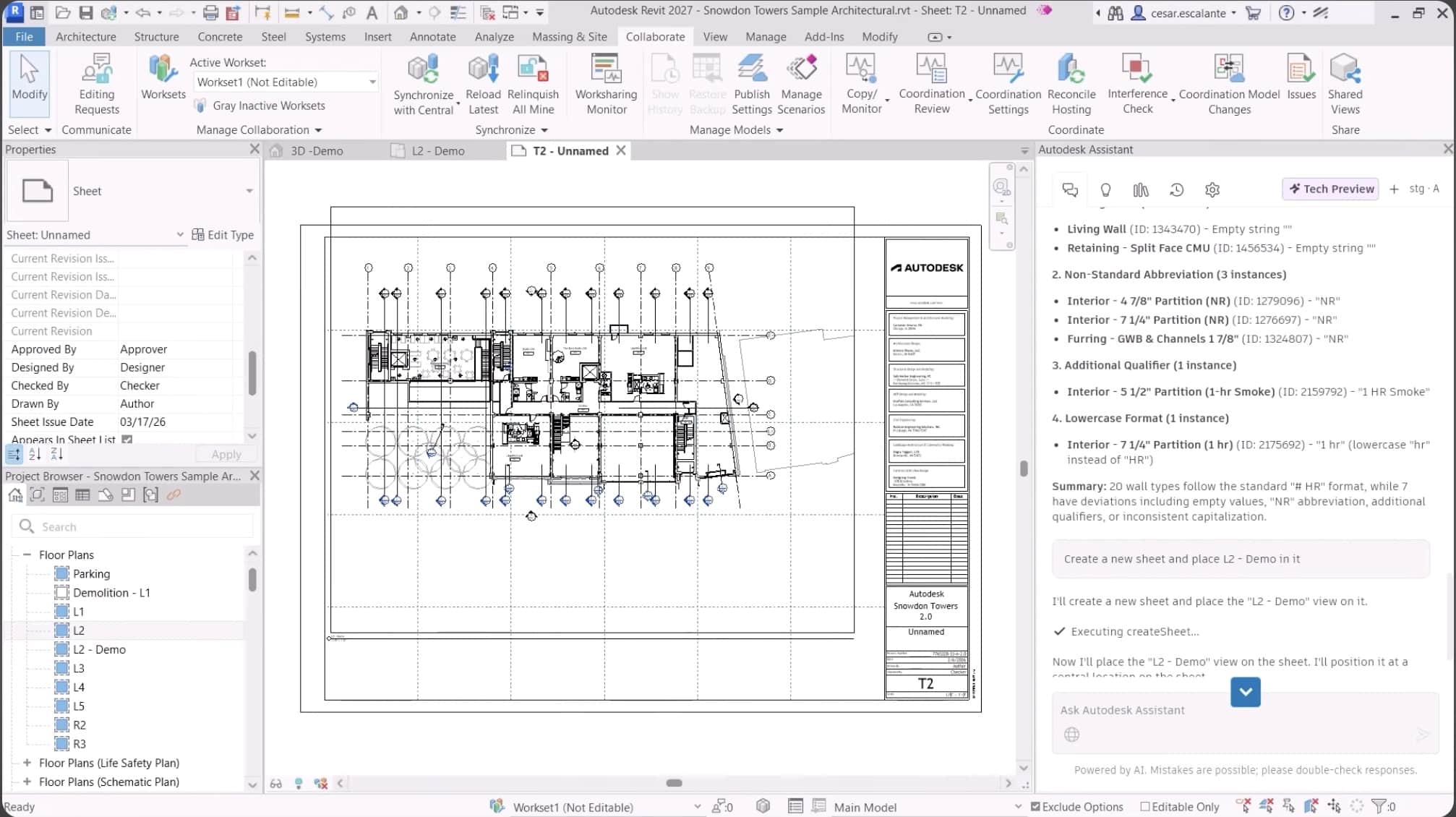
Autodesk Assistant (tech preview), shown in this image of the new Revit 2027, helps users more deeply with context-aware AI assistance.
Autodesk’s AI agent (Autodesk Assistant) leverages Anthropic’s MCP (model context protocol) and is the first version of Revit to officially leverage a built-in MCP server. Introduced in 2024 by Anthropic, MCP is an open-source standard designed to solve “isolation” problems in AI models. What that means in short is that MCP enables AI to look into live BIM model data as if it were a native part of the Revit software, thereby bypassing the long-standing problem of BIM data being isolated within the walled garden of a software application. (see Architosh Analysis and Commentary for more).
MORE: Event: ‘archi+tech’ Social Night at AIA Conference in San Diego
This enables Autodesk Assistant to help you manage and accelerate your BIM workflows, refine those BIM workflows, and automate them. Autodesk Assistant can also save your prompts, so repeatable work goes faster. While early AI tools in Autodesk software helped you understand the application and what it can do, MCP-based AI actually helps you run the Revit 2027 software.
Forma Connectivity
To aid efficiency across teams and multi-stakeholder workflows, Revit 2027 has new connections to the newly updated Forma Cloud. Revit 2027 connects to the new Forma Data Management Essentials, Forma Site Design, Forma Building Design, and Forma Board. All of this comes as standard with a Revit 2027 subscription. For the user, this establishes a cloud foundation for Revit 2027 users, from early-phase site analysis and preliminary design through CDs to construction-phase workflows.
MORE: Autodesk intros new Forma Building Design
Issues for Revit are now part of the core Revit 2027 version. Users can display pinned issues from Forma Data Management directly in their model or create the issues directly in a Revit 3D view, assign responsibilities and due dates, and associate models. The Revit 2027 user can continually monitor and track issues from inside Revit.
Revit 2027 also improves interoperability with more granular control over the model, generating superior IFC exports for consultants. There is a new updated IFC parameter mapping control toolset. Recap Pro and Revit are also more tightly integrated.
Modernized Experience
Revit 2027 is also improved under the hood. Revit’s Accelerated Graphics is no longer a tech preview but is fully supported. The Options Bar is now removed, offering a cleaned-up modern UI/UX. And under the hood, Revit 2027 has been updated to .NET 10 runtime, which provides a faster, more modern, and stable foundation for Revit and its add-ins.
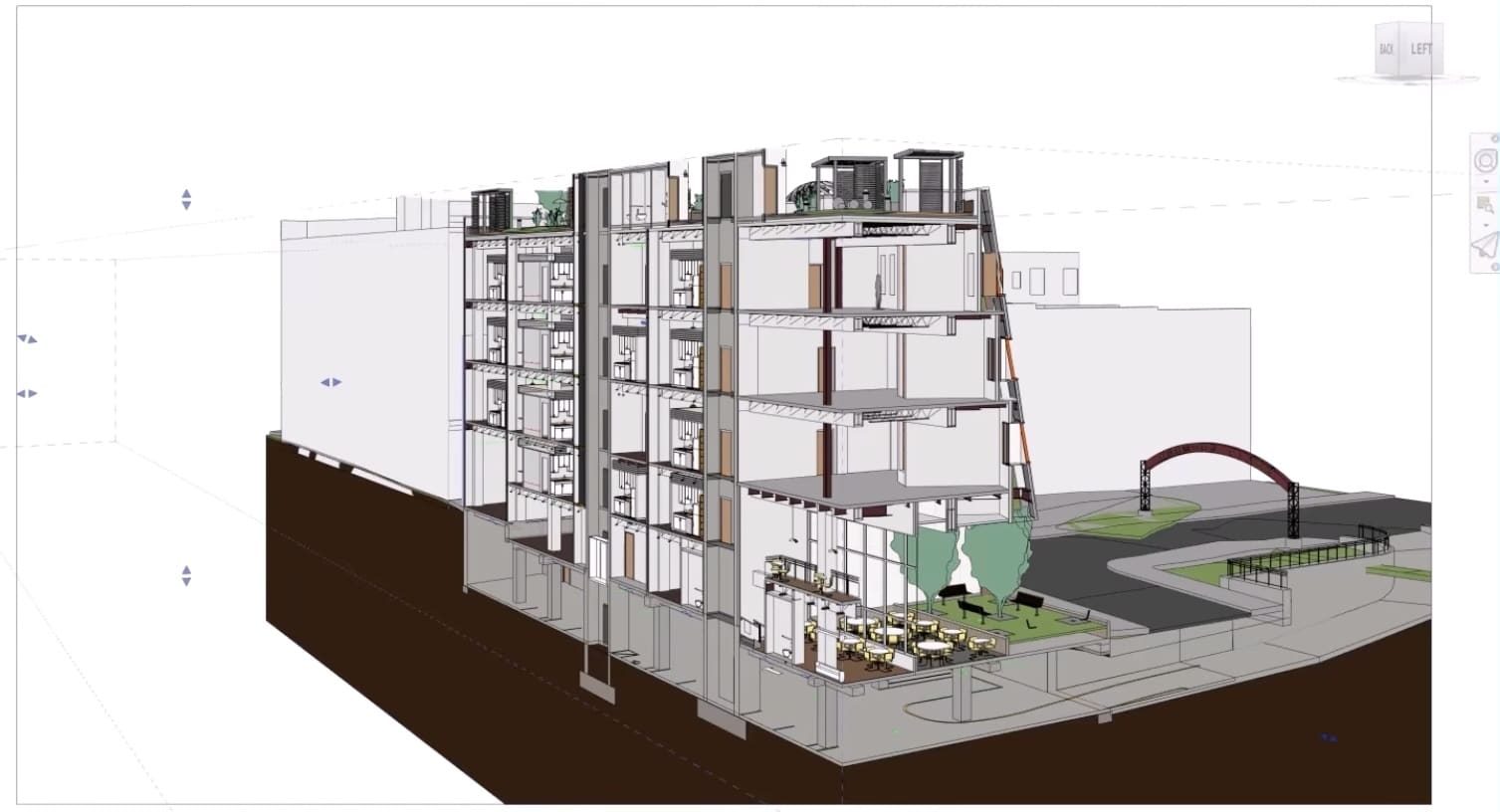
Accelerated Graphics is now foundational in Revit 2027 and works in tandem with .NET 10, which enables Revit to keep pace with modern software development on chips with unified memory (Intel Core Ultra, Apple M-series, etc.). Improved multi-processing due to .NET 10 fundamentally changes how the GPU and CPU process their memory tasks simultaneously, this time during Section Box manipulations.
Dynamo 4.0.2 now runs on .NET 10, resulting in dramatically faster geometry operations, helping complex parametric workflows. As for day-to-day use, the graduation of Accelerated Graphics from tech preview is the biggest win for users, says Autodesk. This is especially true for the user with a powerful GPU.
The section box now updates in real-time as you drag it, a huge win for Revit users who have longed for this since seeing it in rival BIM solutions offered years ago. Archicad’s 3D Cutting Planes have felt instant for well over a decade, and Vectorworks introduced its Clip Cube back in 2014. Why did Revit lag on this for so long? The difference goes back to how Revit was originally coded. Revit has worked by recalculating the entire model’s visibility and graphics every time the box moved. (see our Analysis Section below for a more technical explanation).
With Accelerated Graphics now foundational to Revit in version 2027, it should mean users experience much improved model navigation, increasing speed and responsiveness.
To learn more and watch some videos of the new Revit 2027, visit here.
Editor’s Note
15 Apr 26 — The article has made a correction with Model Context Protocol, correcting “control” for “context.”
Architosh Analysis and Commentary
Software applications have long been a “walled garden” for data, especially for CAD and design applications like BIM. The long-held way to get data out of the walled garden was through a gateway we call “exporting” into industry-standard file formats like DWG, STEP, or IFC, for example. Another way data has been accessible outside the walls of the application is through a dedicated API (application programming interface) provided by the application itself. However, MCP solves technical limitations in an API. Every application API has its own inherent structure, and an AI model like Claude or ChatGPT doesn’t necessarily know how to talk to a Revit API. Without having to write thousands of lines of code to teach an AI how to translate AI prompts into API commands, MCP offers a plug-and-play MCP server model where you can point a generic AI like Claude at the server and the AI self-discovers what an application (like Revit) can actually do by reading its menus and available tools, commands, and knowledge.
You can think of it like this. With Revit 2027 now having its own MCP server, an AI agent can learn nearly everything about Revit, map its software’s capabilities, and understand your specific BIM model’s data. The MCP server itself provides a list of JSON-based schemas that define what the AI can actually do. And the AI instantly understands your BIM model in context. There is so much to be said about the MCP technology in Revit 2027. (see, BIMsmith, “Revit 2027: What the Built-in MCP Server Actually Does in Practice,” 7 Apr 2026).
Finally, on the live section box, catch up. Why so long? The answer is that Revit was originally built as a massive relational database—a parametric spiderweb, if you will. In Revit, every element is aware of every other element. Historically, when you moved the Section Box, Revit tried to “re-solve” those relationships for every element being cut. The foundational issue is how Revit “thinks” about the model versus how other BIM solutions think about the model.
In the case of Revit’s primary rival, Archicad separated the visual representation from the “database” much earlier. Well over a decade earlier. The same with its sister BIM, Vectorworks. The 3D visual environment of Archicad is more like a video game environment, built for real-time speed and interactivity. So, in short, Autodesk finally decoupled the “visual state” from the “database state” as part of its Accelerated Graphics technologies. We believe it now keeps a cached version of the model’s geometry in your GPU’s memory, enabling the user to interact with that geometry while the CPU waits for the mouse to stop before it rebuilds the Revit database. .NET 10 enables these actions to happen in simultaneous multi-processing threads.