Springtime is when the CAD world focuses on AutoCAD and its global competitors in the native DWG CAD space. In our report, we discuss the latest update to the world’s most famous CAD software system.
AutoCAD 2027
AutoCAD 2027 this year offers numerous new features and capabilities, plus enhancements across a deep range of existing features. AutoCAD’s built-in AI systems have been improved and now include a preview technology that leverages one of the AI industry’s hottest technology standards—Model Context Protocol, otherwise known as MCP. The technology was established by Anthropic and we have written about MCP before, most notably last fall with regard to Bluebeam.
A big part of AutoCAD 2027 involves new functionalities connected to the rebranded and updated AEC industry cloud, Forma. Forma Data Management is the new name for Autodesk Docs and version 2027 has streamlined and improved integration with the cloud-based common data environment (CDE).
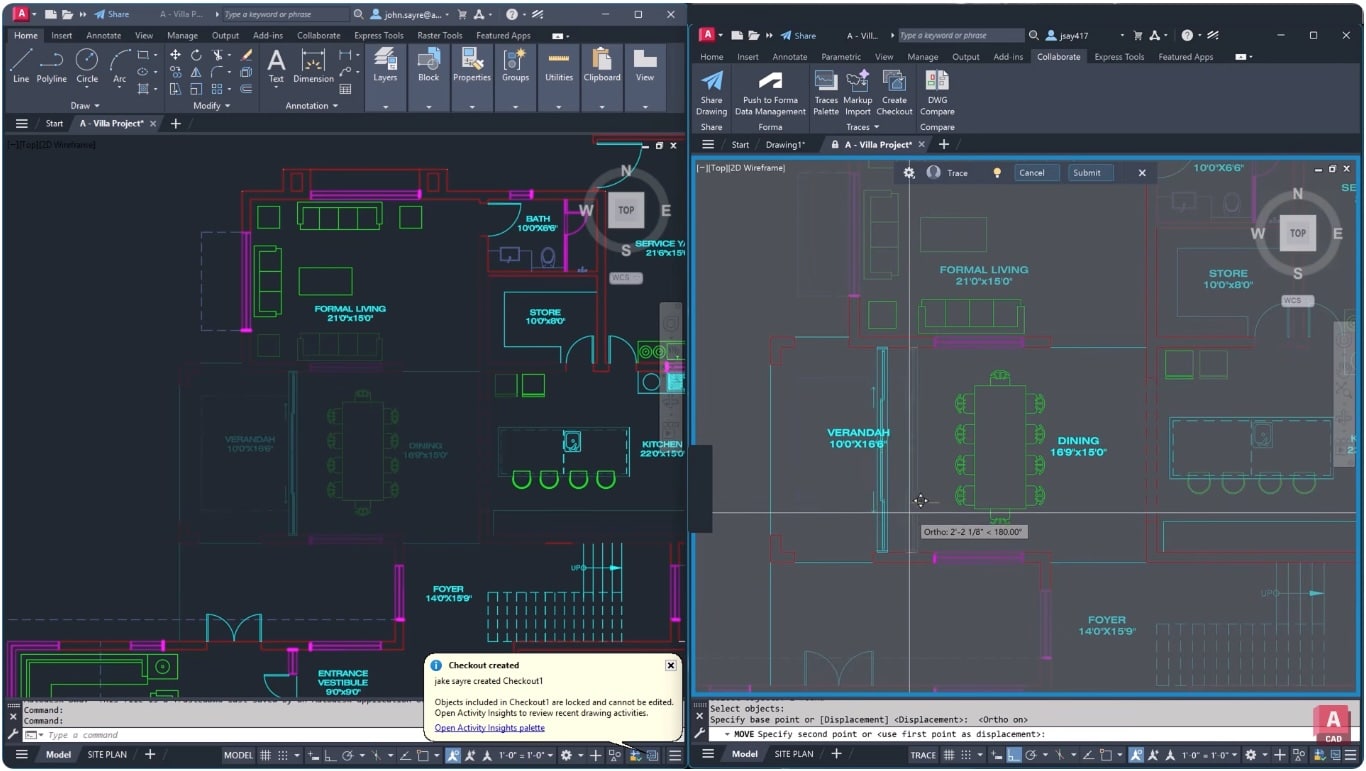
Autodesk AutoCAD 2027 with this image showing the new Checkout features, which are a big change in the world’s most popular CAD program.
Perhaps the biggest and most impactful new feature in AutoCAD 2027 is the new Checkout features. Now multiple parties can work on the same AutoCAD drawing at the same time by reserving specific objects or regions of the drawing. These big features complement a collection of more medium and smaller sized new capabilities that users will undoubtedly enjoy.
For AutoCAD for Mac 2027, including the LT version, the biggest change is that OpenGL has been fully replaced and is no longer supported. Apple Metal is now the sole graphics engine for the Mac version of AutoCAD and AutoCAD LT. This has led to enhanced graphics performance, especially in faster 3D navigation through the cross-platform 3D graphics system. This is part of the broader, unified Graphics System Framework (GSF), not to be confused with major graphics updates to Autodesk Revit. Revit’s new graphics engine is built on Hydra, a high-performance imaging framework originally developed by Pixar. (see further notes in our Analysis section below).
AutoCAD 2027’s GSF-based graphics improvements leverage OS-specific primary graphics APIs. This means Apple Metal for the Mac and DirectX 12 for the Windows version. GSF is not new in version 2027, but rather new in the sense that on the Mac version AutoCAD 3D navigation offloads the scene geometry to Apple Silicon via the Metal API. Metal is superior than OpenGL for 3D CAD performance because it is a lower-level API and reduces processing code complexity associated with the abstraction layers of OpenGL.
Aside from these graphics-related updates to the Mac version of AutoCAD 2027, the version shares most of the major new features of AutoCAD 2027 on Windows including the new geometry cleanup features, Smart Blocks-Detect and Convert, the AI-based Autodesk Assistant, and other features.
For AutoCAD 2027 the big new features are those listed below.
New Features
- New AI-powered workflows — reduce friction and surface the right guidance at the correct time
- New Autodesk Assistant (Tech Preview) — AutoCAD 2027 now leverages Anthropic’s Model Context Protocol (MCP) AI standard to better understand your context, what you are working on, and what you are trying to accomplish. This improves the AI’s responses to you, making them more situational and relevant.
- Forma Data Management Essentials — this is now included with standalone AutoCAD subscriptions and enables collaboration in shared project environments. Teams can view and markup 2D and 3D models, track issues, apply folder-level permissions, and share files with controlled access and clear version visibility. Forma Data Management Essentials is a trimmed down version of Forma Data Management (the new name of Autodesk Docs) and this is where one’s DWG files are stored and where version history and access control for sharing and collaboration is managed.
- Introducing Checkout — Checkout introduces a new way for teams to collaborate on AutoCAD files and to jointly make controlled edits to the same DWG file at the same time when stored in Forma Data Management. This means instead of locking entire drawing files so that one can edit them without the fear of a colleague also editing them at the same time, the new Checkout functionality lets you isolate parts of the AutoCAD file that you control and work on safely in a separate editing environment. When you complete you edits you can submit them as a Trace for review.
- Connected References — the Xref system is more tightly integrated into the cloud environment (now Forma Data Management). When referenced files are moved or renamed, AutoCAD detects this change and suggest automatic repairs directly from the Xref palette.
- Connected Support Files — new centralized control over cloud-managed support files, including tool palettes and CUI customizations. With project-aware tool palettes and CUI, the right resources for projects load automatically with each drawing. This aids consistency and scalability across teams.
- Geometry Clean Up — this technology is essentially project or file health checks features that identify geometry issues such as gaps, overshoots, undershoots, and misaligned angles. The feature after finding these issues then targets solutions to resolving them.
- Forma Data Management Issues Integration — this allows AutoCAD 2027 users to view, create, and resolve issues directly within the drawing, keeping feedback visible and actionable.
AutoCAD 2027 also boasts improved 3D visualization with extended support for the Graphics System Framework (GSF). This boosts performance in AutoCAD 3D workflows and supports realistic visual styles, materials, and lighting.
There is also improvements with plotting, saving plots directly to the cloud, previewing PDFs and other improvements, along with Sheet Set Manager improvements, connecting support files.
Forma Board Integration
Finally, Autodesk Forma Board integration is included as part of general Forma integration. This means AutoCAD on the Web now integrates with Forma Board, connecting detailed CAD drafting with collaboration in early design phase workflows.
The features of Forma Board can be leveraged, enabling teams to view and edit DWG files within a shared canvas environment.
To learn more visit here.
Architosh Analysis and Commentary
Autodesk 2027 is delivering a powerful new feature in its Checkout capabilities, enabling teammates to work on the same DWG files at the same time. This is accomplished at the cloud level and bypasses the simple OS-level file locking. When a user “checks out” parts of a file, they are reserving specific objects or areas. The cloud-based data management layer in the Forma cloud keeps track of these reservations. This is a significant new capability and competitive punch to Autodesk’s native DWG competitors, one of which, we know for sure does not have a matching capability.
Interestingly, the changes that are done using Checkout capabilities to the Trace Layer next for review and cannot be committed directly to the master file in the cloud by the person making the changes. The person who has permission to commit Trace Layer changes is the primary read-write owner. This is the person who has the master AutoCAD file open from the cloud with full read-write access. A collaborator (unlike the owner) is the one who checks out specific geometry or areas to work on.
A big difference with Autodesk’s competitive posture with AutoCAD over its DWG rivals is that the company can build bridges and integrations from Autodesk ecosystem products to other products—especially those in the cloud. This is passing through the Forma AEC industry cloud now but with our coverage of version 2026, we noted industry toolkits were more tightly integrated into other Autodesk solutions like Fusion 360.
Another big update in version 2027 is the MCP integration, a standard developed by AI company Anthropic. Some companies are using MCP to control the application via text prompt instructions but it appears that is not exactly what AutoCAD 2027 is doing yet, instead using AI to understand your drawing context and help with workflows. Finally, the new full Metal integration is a big and great new change for Mac AutoCAD users.